Shopify compare-at prices can now travel beyond the storefront. On October 9, 2026, Shopify announced that Catalog can share an eligible compare-at value with AI shopping agents. The current price still uses price; the new reference value appears as list_price.
This is a narrow product-data update with a wide operational consequence.
A genuine markdown gains useful context in an AI answer. A stale or misleading reference price can gain the same reach. Before switching the field on for holiday offers, trace each price through variants, markets, product pages, feeds, and checkout. Better price context still does not guarantee an AI recommendation or a sale.
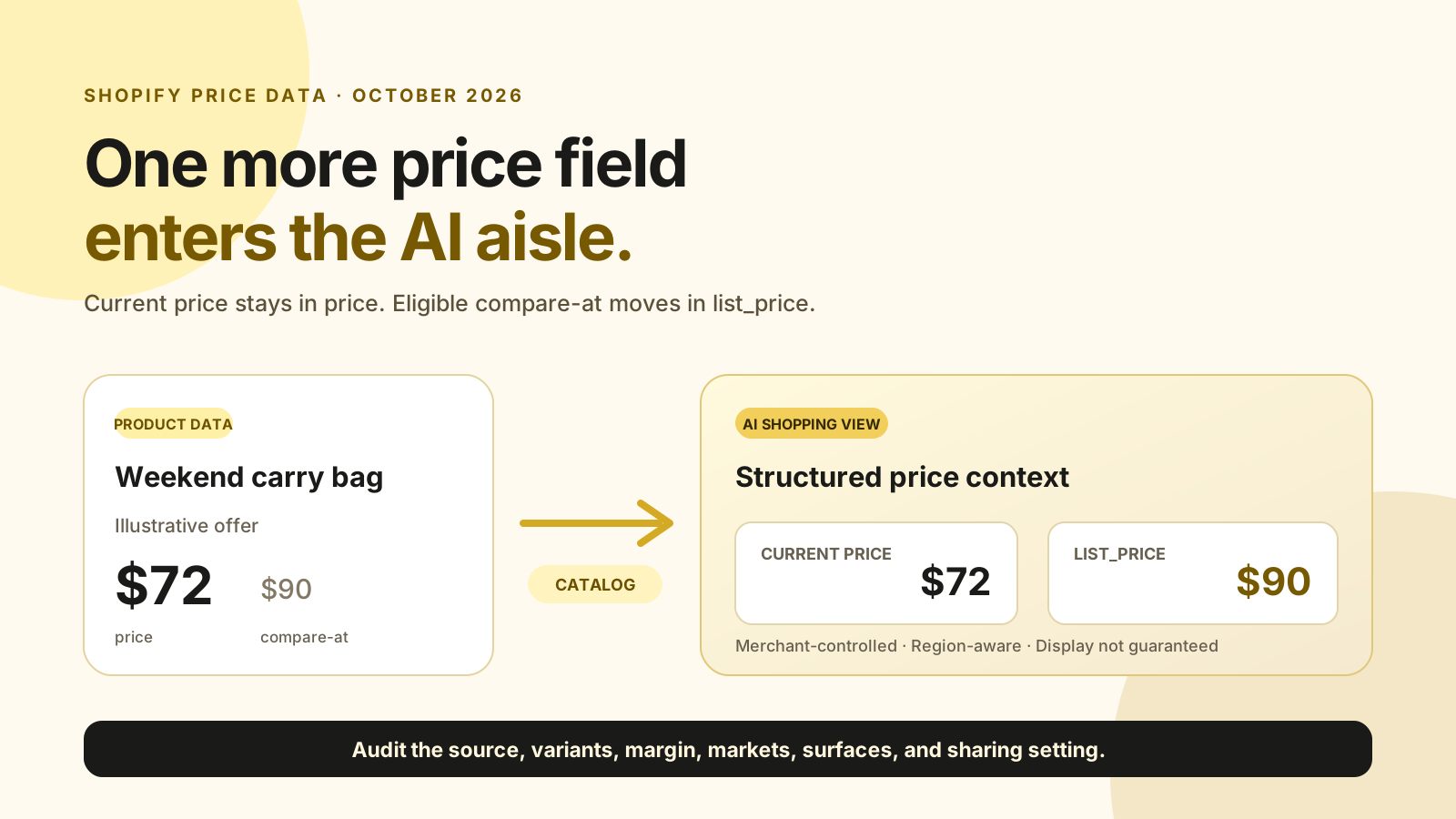
list_price beside the unchanged current price.What Shopify Catalog now returns
On October 9, 2026, Shopify’s Catalog API announcement documented one optional field: list_price. It carries a merchant’s compare-at price on each eligible variant. The existing price field does not change, and products can also return a range across variants. The public Shopify changelog update explains the merchant impact. AI shopping agents reading Catalog previously received the current price without the markdown context shown on the storefront. They can now tell when an eligible product is marked down and by how much.
| Catalog response | Before October 9 | After October 9 |
|---|---|---|
| Current selling price | Available as price |
Still available as price |
| Compare-at value | Not returned | Optional list_price |
| Variant range | Current-price data | Optional list_price_range |
| Merchant control | Not applicable | Compare-at switch in Catalog Mapping |
This is not a new discount engine. It makes an existing merchant-controlled relationship machine-readable. The wider Shopify agentic commerce guide covers how Catalog, discovery, and checkout fit together.
Why does compare-at context matter now?
In 2026, Shopify’s Global Holiday Retail Report surveyed 18,000 consumers and 7,500 business leaders across nine markets. Shopify’s October 6 analysis reported that 65% of shoppers planned to use AI for at least one holiday shopping task. Clear price context is arriving as AI-assisted product research moves into a major selling season.
The same Shopify holiday analysis, published October 6, 2026, found that 71% of regular AI users were more likely to choose an independent brand than the year before. Yet only one-third trusted an AI agent to complete a purchase. That gap places the near-term opportunity in discovery, comparison, and explanation rather than fully autonomous buying.
The useful change is not that agents will prefer every discounted item. It is that a genuine markdown no longer has to lose its reference price when it enters Shopify Catalog. A product can carry more offer context into the research stage, while the store still has to earn the purchase.
For titles, descriptions, categories, and attributes beyond price, use the Shopify SEO for AI search guide. This article stays focused on the new price field and the controls around it.
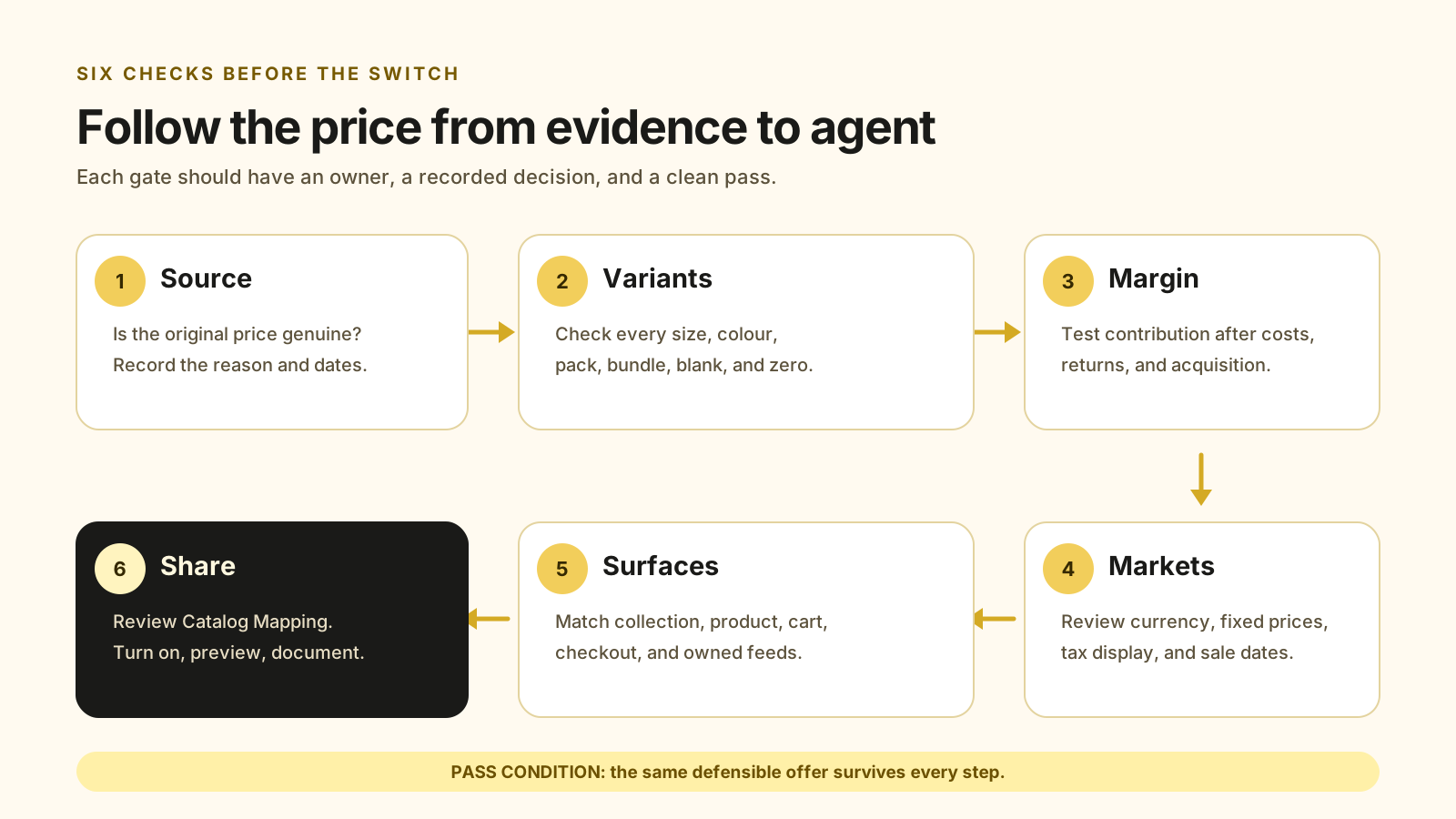
Run these 6 Shopify compare-at price checks
Shopify documents three gates for list_price: sharing must be on, compare-at must exceed the buyer’s current price, and the store must show compare-at prices in that buyer’s region. The six checks below turn those platform rules into a promotion audit that also protects margin and cross-channel consistency.
1. Confirm what the reference price means
Write down the reason for every compare-at value. Shopify’s sale-pricing documentation defines it as the original price and requires it to exceed the current price. If your store uses the field for MSRP or another reference, review Shopify’s default sharing choice before publishing.
2. Validate every variant pair
Check Price and Compare-at price for every size, colour, pack, and bundle in the promotion. Shopify notes that empty, zero, or conflicting variant values can stop a collection page from presenting a product as on sale, even when one selected variant looks correct on its product page.
3. Test the margin at the sale price
An agent can explain a markdown, but it cannot make the order profitable. Model product cost, payment fees, fulfilment, shipping support, returns, and acquisition spend at the proposed price. Use the unit economics calculator before approving deeper cuts, then compare the result with the 2026 holiday discount strategy.
4. Review each target market
Do not copy one market’s reference price into every region without checking it. Shopify states that fixed market prices can override the prices entered in the main product record. Record the current price, compare-at price, currency, tax treatment, and promotion dates for each priority market.
5. Reconcile every customer-facing surface
Test the collection card, product page, cart, and checkout on mobile and desktop. Then compare any owned product feeds. Google’s sale price specification requires a submitted sale price to match the landing page and checkout, while the full price continues in the regular price attribute.
6. Review Catalog Mapping and preview
Shopify’s Catalog Mapping guide places the control under Sales channels, Agentic, Shopify Catalog, and Review product data mapping. Turn the Compare-at switch on only after the audit. Shopify warns that its preview is not an exact prediction of how an AI channel will present the data.
Regional pricing needs its own review
Google’s 2026 sale price annotation requirements apply different price-history conditions by surface and market. For UK-facing offers, the Competition and Markets Authority’s price transparency summary says prices must be clear, complete, and accurate.
Those rules do not turn this article into legal advice. They show why a single global spreadsheet is not enough.
The US, UK, India, and other markets may share the same product while using different currencies, fixed prices, tax presentation, and promotion histories. Verify the applicable platform rules and obtain local legal advice where needed.
Treat compare-at as a factual product attribute, not decorative sales copy. Once it becomes structured data, inconsistencies are easier for feeds, agents, and shoppers to compare. The safest workflow assigns one owner to the reference price, its evidence, its dates, and its market scope.
What should merchants not assume?
Shopify’s documentation uses the word “might” when describing strikethrough pricing. Do not assume that enabling the switch guarantees display, a badge, a ranking gain, or a sale.
The update supplies another structured fact; each shopping surface controls how it uses that fact.
Also do not treat discount codes, automatic discounts, and product-level sale pricing as interchangeable. Shopify displays compare-at and current prices on supported product and collection pages, while checkout discounts follow a different workflow. Pick the right mechanism for the offer before trying to make it legible to an agent.
Make the offer clear from discovery to checkout
MlabsGrowth reviews Shopify pricing, merchandising, product pages, and checkout friction as one buying journey. The goal is a credible offer that still protects contribution margin.
Frequently asked questions
What is a Shopify compare-at price?
A compare-at price is the original product or variant price shown beside a lower current price. Shopify requires it to be higher than the current Price value for sale pricing to display. It is different from a discount code or an automatic checkout discount.
Can AI shopping agents see Shopify compare-at prices?
Yes, when the merchant shares them and Shopify’s three documented conditions are met. Since October 9, 2026, Shopify Catalog can return an eligible compare-at value as list_price while leaving the current price field unchanged.
Will a compare-at price make an AI agent recommend a product?
No. Shopify says AI agents might use the value to advertise strikethrough pricing. The update adds one structured price field; it does not promise placement, ranking, a sale badge, or a purchase. Product relevance and the rest of the buying journey still matter.
Source notes
- Shopify Developer Changelog, Catalog API now returns compare-at prices as list_price, published 2026-10-09, retrieved 2026-10-13.
- Shopify Changelog, Compare-at prices now shared to agentic channels, published 2026-10-09, retrieved 2026-10-13.
- Shopify Help Center, Customizing your product data for Shopify Catalog, publication date not shown, retrieved 2026-10-13.
- Shopify Help Center, Shopify Catalog and product discovery for agentic storefronts, publication date not shown, retrieved 2026-10-13.
- Shopify Help Center, Setting sale prices for products, publication date not shown, retrieved 2026-10-13.
- Shopify, Shopify Holiday Retail 2026, published 2026, retrieved 2026-10-13.
- Shopify, Welcome to the first holiday season of the agentic era, published 2026-10-06, retrieved 2026-10-13.
- Google Merchant Center Help, Sale price [sale_price], publication date not shown, retrieved 2026-10-13.
- Google Merchant Center Help, About sale price annotations, publication date not shown, retrieved 2026-10-13.
- Competition and Markets Authority, Providing clear and accurate information about prices, updated 2026-01-07, retrieved 2026-10-13.
For wider Shopify conversion and operations work, see all MlabsGrowth services.
