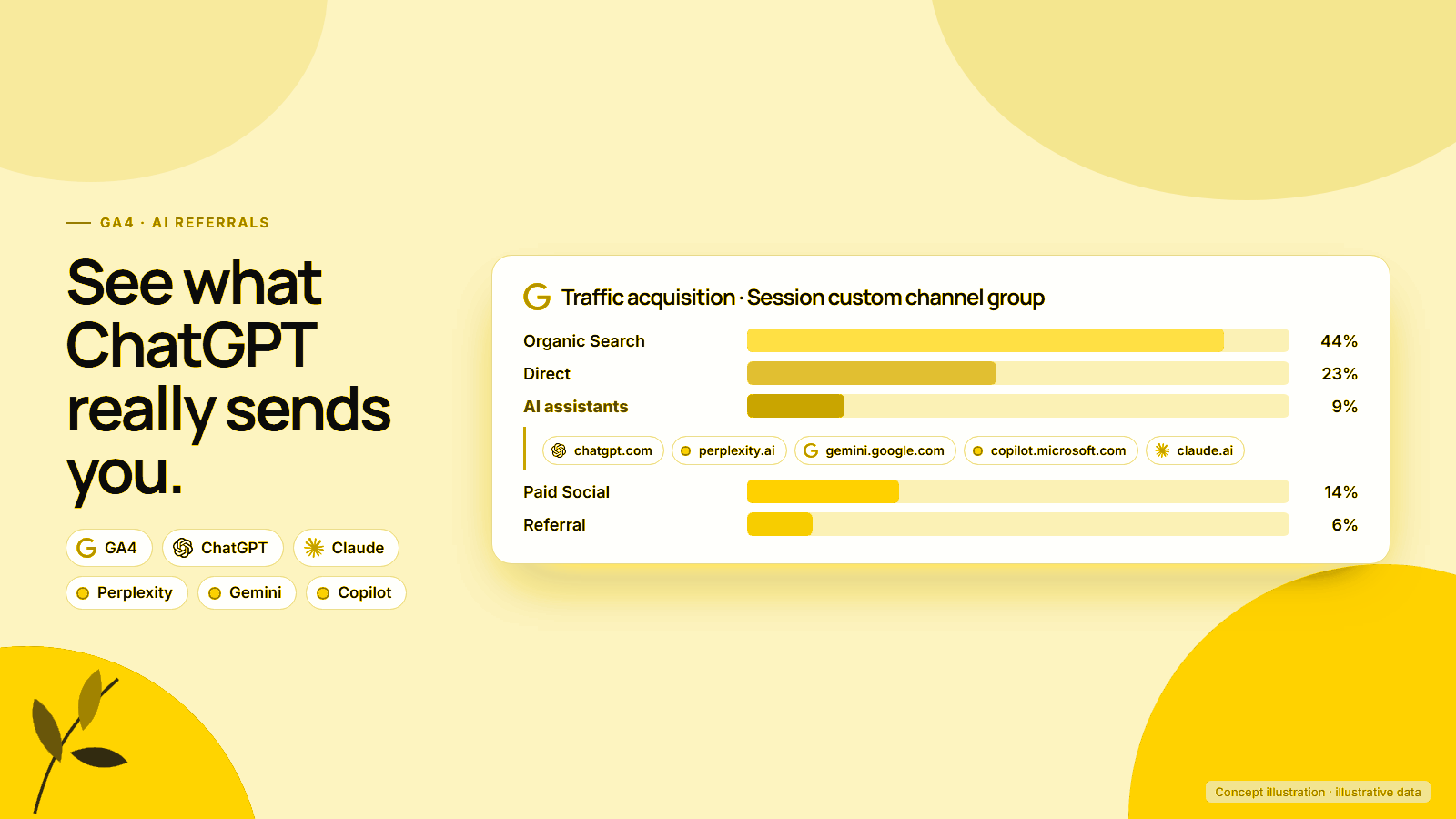
ChatGPT, Perplexity, Gemini and Claude now send shoppers to online stores every day, but most analytics setups still file those visits under Referral or Direct. The result is a channel that store owners hear about constantly and cannot see in their own numbers.
That changed partly in May 2026. Google Analytics added a native AI Assistant channel to its default channel group, and Shopify’s reports can filter AI answer engines by referrer. Neither view is complete on its own. Google’s own AI Overviews and AI Mode are not in the new channel at all, and some AI visits still arrive with no source.
What follows covers how to track AI traffic in GA4 in 2026: what the native channel catches, how to build a custom channel group with a tested regex for the rest, how to cross-check in Shopify, and how to judge AI visits by orders and revenue rather than sessions.
Platforms in this guide
 Google Analytics 4
 ChatGPT
 Claude
 DeepSeek
Perplexity
DeepSeek
Perplexity
 Shopify
Why AI traffic deserves its own channel
AI traffic is small but growing fast, and it behaves differently from search or social visits. Shopify reported that AI referral sessions to its stores grew more than 8 times year on year in Q1 2026 and AI-referred orders grew nearly 13 times.
Mixing those visits into Referral hides a channel that may deserve its own budget and content plan.
The same Shopify AI search insights report, released on 11 May 2026, found that 55% of AI sessions start on a product page. Those sessions convert nearly 50% higher than organic search, with a 14% higher average order value. Adobe data reported by Digital Commerce 360 showed AI referrals to US retail sites up 62% year on year in July 2026, converting 60% better than non-AI traffic.
Similarweb’s AI referral traffic analysis estimates AI platforms sent an average of 770.7 million visits a month worldwide between June 2025 and May 2026, up 117.4% year on year, with ChatGPT responsible for more than 80% of AI referrals to the top 1,000 domains.
Not every study agrees on quality. An academic study of 973 ecommerce sites, reported by Digital Commerce 360, found ChatGPT traffic underperformed every traditional channel except paid social on conversion rate and revenue per session. That disagreement is the best reason to measure your own store.
Does GA4 track ChatGPT traffic automatically?
Partly. GA4’s What’s new page records a 13 May 2026 update adding a dedicated way to measure traffic from popular AI assistants. The default channel group now defines AI Assistant as traffic from sources like ChatGPT, Gemini, DeepSeek, Copilot or Grok, excluding Google’s AI Overviews and AI Mode.
The condition behind the channel is simple. Google says the medium is set to ai-assistant and the campaign to (ai-assistant) when the referrer matches its list of AI assistants. The channel then matches traffic where the medium exactly equals ai-assistant.
Three gaps remain:
- The referrer list is not published. The launch note names ChatGPT, Gemini and Claude, while the definitions page names ChatGPT, Gemini, DeepSeek, Copilot and Grok. Perplexity is named on neither, and Search Engine Journal reported Perplexity visits landing in Referral.
- History is unclear. Google does not say whether the native channel reclassifies traffic from before May 2026.
- UTM-tagged links bypass it. A link that already carries its own
utm_mediumis classified by that medium, not by the referrer.
Open Reports > Acquisition > Traffic acquisition, switch the dimension to Session default channel group and look for AI Assistant. Then switch to Session source and search for AI domains that still appear under Referral. Anything you find there is the case for a custom channel group.
Building an AI channel group in GA4
Create a custom channel group by copying the default group, adding an “AI assistants” channel and placing it above Referral. Google’s custom channel groups documentation says custom groups apply to reports retroactively, and traffic is assigned to the first channel whose definition it matches, so order decides the result.
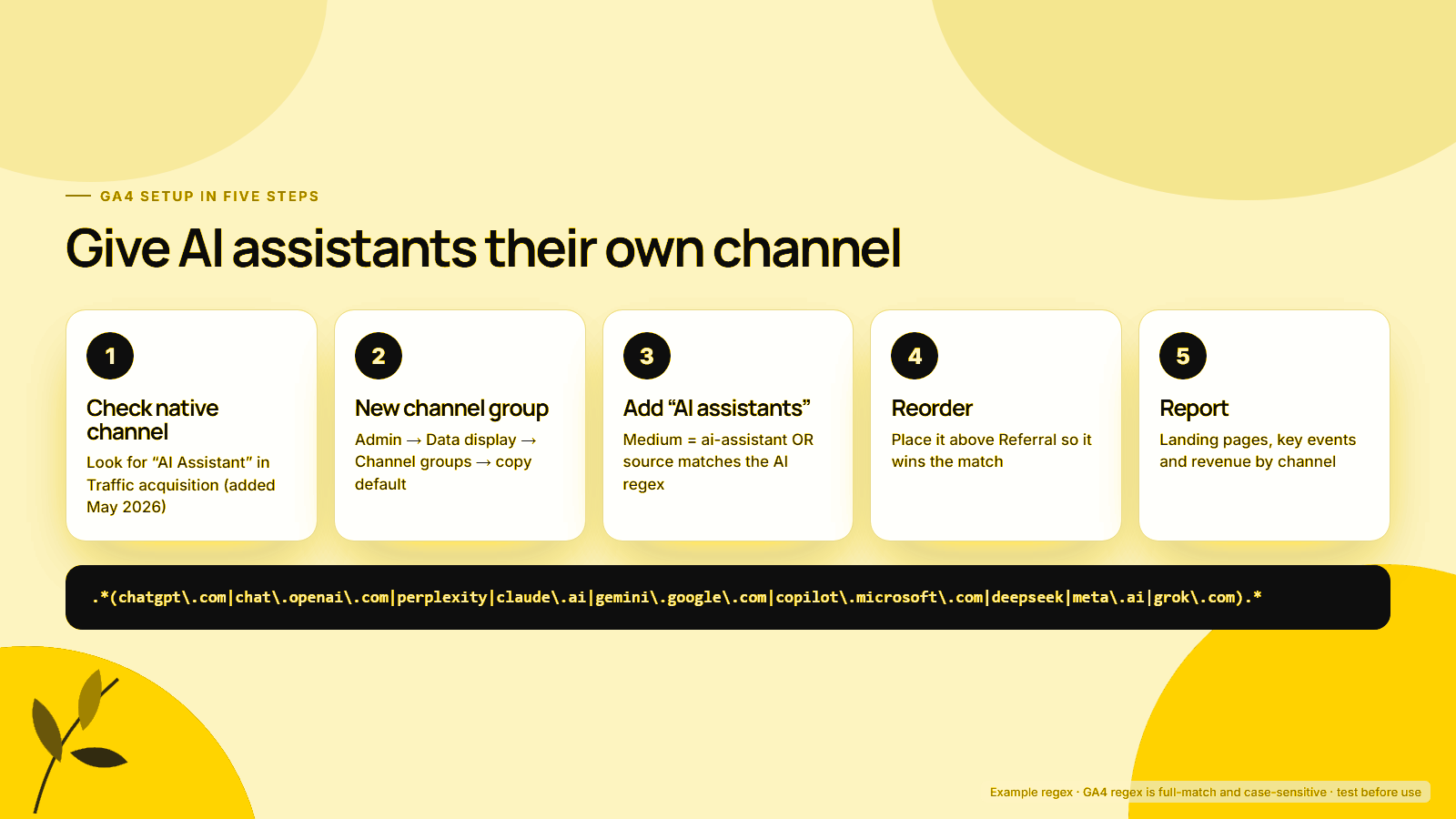
- Check the native channel. Confirm what AI Assistant already captures, as described above.
- Create the group. In Admin, under Data display, click Channel groups, then copy the default channel group so every other channel keeps its standard rules.
- Add the channel. Name it “AI assistants”. Set two conditions joined by OR: Medium exactly matches
ai-assistant, or Session source matches the regex in the next section. - Reorder. Use Reorder to move “AI assistants” above Referral. Google’s own example gives the same instruction.
- Report. In Traffic acquisition or an exploration, switch to your new channel group and add landing page, key events and revenue.
Standard GA4 properties allow 2 custom channel groups in addition to the default, and 360 properties allow 5, with up to 50 channels per group. Google notes that custom channel groups cannot be used in the Key events paths report.
A regex for AI sources, and how it behaves
Use a full-match pattern that wraps the AI domains in .* on both sides. Google’s regex documentation says GA4 uses RE2 syntax, matches the full value by default and is case-sensitive. A pattern without .* only matches sources that equal a domain exactly.
.*(chatgpt\.com|chat\.openai\.com|perplexity|claude\.ai|gemini\.google\.com|copilot\.microsoft\.com|deepseek|meta\.ai|grok\.com).*How the pattern behaves:
| Session source | Matches? | Why |
|---|---|---|
chatgpt.com |
Yes | Domain in the list |
perplexity.ai or perplexity |
Yes | “perplexity” appears anywhere in the source |
gemini.google.com |
Yes | Full host listed; plain google does not match |
ChatGPT (capitalised UTM) |
No | Regex is case-sensitive; add a lowercase rule or fix the UTM |
blog.openai.com |
No | Only chat.openai.com is listed |
Avoid copying very broad patterns. Google’s own example in its help page includes fragments such as ^.*ai and .*gpt.*, which can match unrelated sources ending in “ai” or containing “gpt”. Test any pattern in Explore with a Session source filter before saving it to a channel group, and add new assistants as they appear in your referral list.
ChatGPT also adds tracking to some outbound links. Search Engine Roundtable reported in June 2025 that ChatGPT began appending utm_source=chatgpt.com to certain links, which is why chatgpt.com can appear as a source even without a referrer.
Where do Google AI Overviews and AI Mode clicks go?
They go to Organic Search. Google’s channel definitions say Organic Search includes non-ad links in Google’s AI Overviews and AI Mode, and the AI Assistant channel explicitly excludes both. Your AI channel group will not show these clicks, and it should not try to.
Google Search Central’s AI features documentation says sites appearing in AI features such as AI Overviews and AI Mode are included in overall search traffic in Search Console, under the Web search type of the Performance report. There is no separate AI Overviews filter.
For a Shopify store, that means two different AI reports: GA4’s AI channel for assistants like ChatGPT and Claude, and Search Console for Google’s own AI features. Our Shopify SEO for AI search guide covers how to earn visibility in both, and the Google UCP checkout guide explains what changes when shoppers can buy inside AI Mode.
AI traffic that hides in Direct
GA4 can only assign a source when the browser sends a referrer or the link carries UTM parameters. Clicks from mobile apps, copied links and links marked noreferrer arrive with neither, so GA4 records them as Direct. Seer Interactive’s analysis of AI traffic warns that ChatGPT visits without UTMs or referral data will likely appear as Direct.
The technical reason is documented by MDN: a rel="noreferrer" link tells the browser to omit the Referer header entirely. Search Engine Journal noted that the new native channel cannot recover those visits either.
You cannot fix hidden AI traffic, but you can estimate it:
- Watch for Direct sessions landing deep on product pages, which people rarely type by hand.
- Compare Direct trends with the AI channel; if both rise together, some AI traffic is hiding.
- Add a “How did you hear about us?” question after checkout with ChatGPT and other assistants as options.
Treat your AI channel as a floor, not a total. The number in GA4 is the AI traffic you can prove. The real figure is higher, and a post-purchase survey is often the only way to size the gap.
How do you see AI traffic in Shopify?
Use the Sessions by referrer report. Shopify’s acquisition reports documentation says it shows whether visitors come directly, from search or by referral, with dimensions for referring channel, platform and medium. Shopify’s AI search insights explain how to filter AI answer engines under Referrer channel.
According to Shopify, filter Referrer channel for ChatGPT, Perplexity and Copilot. For Gemini, filter Referrer host for gemini.google.com. Orders placed through Shopify’s agentic storefronts, which cover ChatGPT, Google AI Mode, Gemini, Microsoft Copilot and Meta, show channel or referrer attribution in the Shopify admin.
Expect GA4 and Shopify to disagree. They use different session definitions, consent handling and attribution windows. Pick one as the source of truth for AI revenue, usually Shopify for orders and GA4 for behaviour, and compare trends rather than exact totals. Our agentic commerce guide explains how AI channels reach the Shopify checkout in the first place.
From sessions to revenue and margin
Report AI traffic by revenue, orders and contribution per session, split by landing page type. Sessions alone tell you the channel exists. Revenue per session and margin tell you whether to invest in it, and the landing page split shows whether shoppers arrive ready to buy or still researching.
Build one monthly view with these columns:
| Metric | Where to get it | What it tells you |
|---|---|---|
| AI sessions by assistant | GA4 custom channel group, Session source | Which assistants send visitors |
| Landing page type | GA4 exploration | Product page vs blog or collection entry |
| Conversion rate and revenue per session | GA4 or Shopify | Buying intent compared with other channels |
| Orders with AI referrer | Shopify Sessions by referrer, agentic storefront orders | Revenue you can attribute |
| Contribution per order | Your margin model | Whether AI orders are profitable |
Run the contribution figures through the unit economics calculator so AI orders are judged on profit after product, shipping and payment costs. The POAS vs ROAS guide explains why that matters more than revenue once ChatGPT Ads and other paid AI placements enter the mix.
If AI traffic lands mostly on product pages and converts well, invest in product data: our Shopify SEO for AI search guide is the next step. If it lands mostly on guides, invest in answer-first content.
A monthly AI traffic routine
Once the channel group exists, the same short check each month keeps the numbers honest:
- In Traffic acquisition, look at AI Assistant under Session default channel group, then switch to Session source and search for AI domains still sitting in Referral.
- Add any new assistant to the regex, and test the change in Explore with a Session source filter before saving it.
- Cross-check Shopify’s Sessions by referrer report and agentic storefront orders, comparing trends rather than exact totals.
- Watch Direct sessions that land deep on product pages against the AI channel trend, and read the post-purchase survey answers to size what is hiding.
- Fill in the monthly view of sessions, landing page type, revenue per session, orders and contribution per order, then decide whether the next investment is product data or answer-first content.
That routine is what turns “ChatGPT is sending us traffic” into a budget decision.
See what AI assistants really send you
MlabsGrowth sets up AI channel tracking in GA4 and Shopify, connects it to orders and margin, then shows which products and pages AI assistants are already recommending.
Frequently asked questions
Does GA4 track ChatGPT traffic automatically?
Partly. Since 13 May 2026, GA4’s default channel group includes an AI Assistant channel for traffic from sources such as ChatGPT, Gemini, DeepSeek, Copilot and Grok. Google has not published the full list of recognised referrers, so check your Session source report and add a custom channel group for anything the native channel misses.
Are Google AI Overviews and AI Mode clicks counted as AI traffic?
No. Google’s default channel definitions say the AI Assistant channel excludes AI Overviews and AI Mode. Those clicks are counted as Organic Search in GA4, and Search Console includes them in the Web search type of the Performance report without a separate filter.
What regex should I use for AI traffic in GA4?
Use a condition where Session source matches a pattern such as .*(chatgpt\.com|chat\.openai\.com|perplexity|claude\.ai|gemini\.google\.com|copilot\.microsoft\.com|deepseek|meta\.ai|grok\.com).* and add Medium exactly matches ai-assistant. GA4 regex is full-match and case-sensitive, so test the pattern in an exploration first.
Why does some ChatGPT traffic show up as Direct?
A visit only gets a source when the browser passes a referrer or the link carries UTM parameters. Clicks from mobile apps and links that strip the referrer arrive without either, so GA4 records them as Direct. The new AI Assistant channel cannot recover those visits.
How do I see AI traffic in Shopify analytics?
Open the Sessions by referrer report and filter Referrer channel for AI answer engines such as ChatGPT, Perplexity and Copilot, according to Shopify. For Gemini, filter Referrer host for gemini.google.com. Orders from Shopify’s agentic storefronts show channel or referrer attribution in the admin.
Source notes
- Google Analytics Help, [GA4] Default channel group, retrieved 2026-09-24.
- Google Analytics Help, [GA4] Custom channel groups, retrieved 2026-09-24.
- Google Analytics Help, What’s new in Google Analytics, entry dated 2026-05-13, retrieved 2026-09-24.
- Google Analytics Help, About regular expressions (regex), retrieved 2026-09-24.
- Google Search Central, AI features and your website, updated 2025-12-10, retrieved 2026-09-24.
- Search Engine Journal, Google Analytics Adds AI Assistant As Default Channel Group, published 2026-05-14, retrieved 2026-09-24.
- Search Engine Roundtable, ChatGPT adds UTM parameters to links, published 2025-06-16, retrieved 2026-09-24.
- Seer Interactive, Your AI Traffic Is Hiding, updated 2026-06-22, retrieved 2026-09-24.
- MDN Web Docs, rel=noreferrer, retrieved 2026-09-24.
- Shopify Help Center, Acquisition reports, retrieved 2026-09-24.
- Shopify Help Center, Agentic storefronts, retrieved 2026-09-24.
- Shopify, AI search insights, published 2026-05-11, retrieved 2026-09-24.
- Digital Commerce 360, Adobe AI referral traffic data, July 2026, published 2026-08-19, retrieved 2026-09-24.
- Similarweb, AI Referral Traffic by Industry, published 2026-09-03, retrieved 2026-09-24.
- Digital Commerce 360, Study: ChatGPT traffic and sales trail traditional digital channels, published 2025-10-24, retrieved 2026-09-24.
