When a Shopify discount code is not working, rebuild the failing checkout and test one rule at a time. Start with the exact error message, then check status, cart eligibility, customer, market, combinations, channel, and any app or draft-order path. Random edits make the failure harder to locate.
Use a fresh browser session and one controlled cart. Record what changes between a passing test and the customer’s failed attempt.
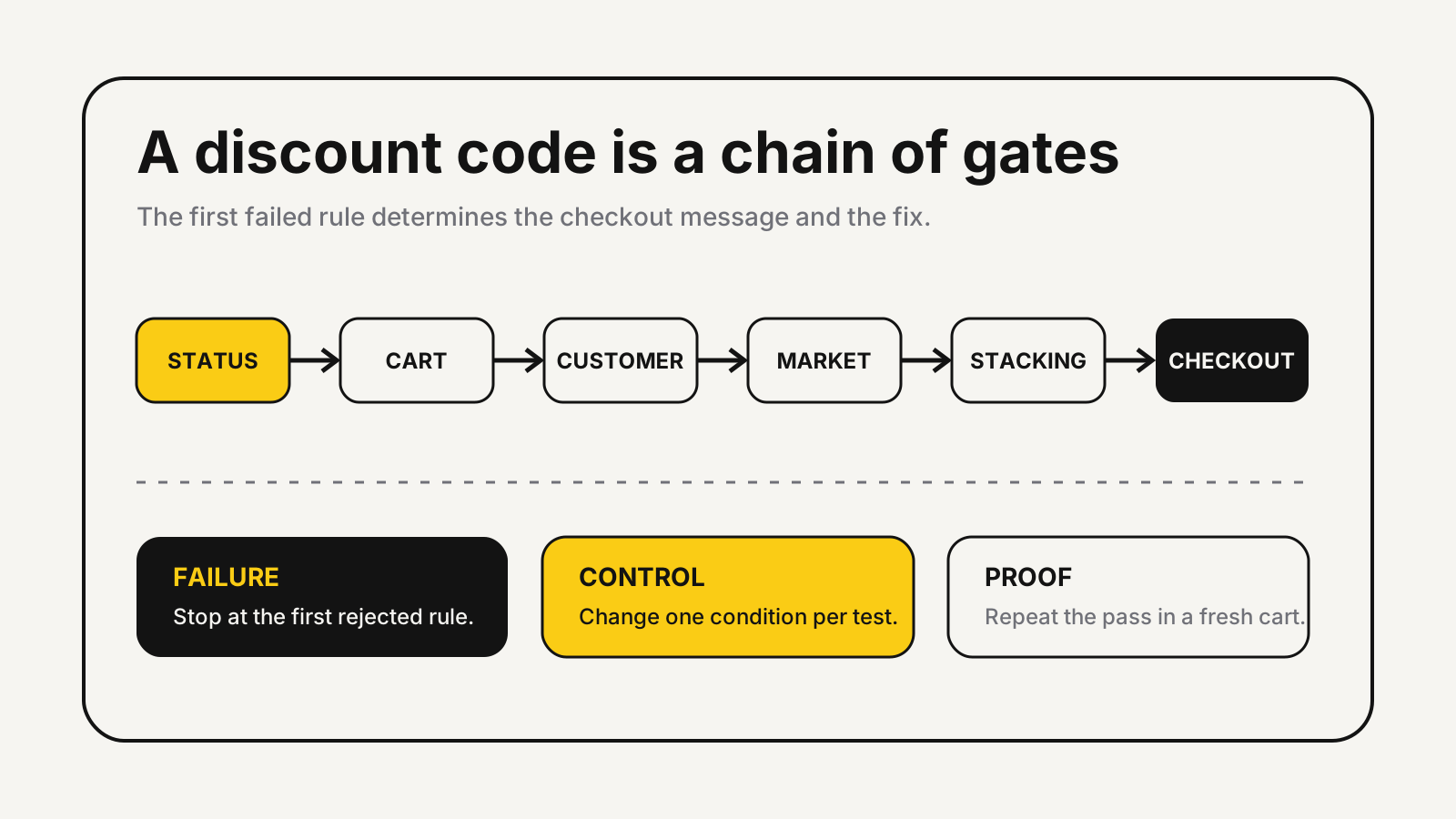
Shopify discount code not working: read the error first
Shopify separates three common failures in its Discount codes FAQ. A code that does not exist or is inactive produces an “Enter a valid discount code” message. An existing code that misses the cart’s product rules gets a cart-specific rejection. Incompatible codes produce a combination message.
That wording tells you where to begin.
| Customer message or symptom | First check | Do not assume |
|---|---|---|
| “Enter a valid discount code” | Code spelling, active status, start and end time | The cart is wrong |
| “Isn’t valid for the items in your cart” | Products, collections, purchase type, minimum | The code is inactive |
| “Couldn’t be used with existing discounts” | Automatic offers and combination settings | The customer entered too many codes |
| Field appears in checkout but not cart | Theme or cart app | Shopify rejected the code |
| Works for one shopper only | Customer, market, usage, or identity rules | A global outage exists |
If the code works at checkout but fails in a cart drawer or cart page, move the investigation to the theme or app that created that field. A Shopify Community case showed exactly that split: checkout accepted the code while the theme-level cart field did not.
Rebuild the customer’s exact checkout
A useful reproduction matches the failing cart, customer state, market, channel, and competing discounts. “It works for me” proves little if the operator tested a different product or entered checkout from another route.
Create a test sheet with these fields:
- code entered, including capitalization and stray spaces
- product and variant IDs in the cart
- collection membership at test time
- quantity and subtotal before the code
- one-time or subscription purchase
- logged-in status, email, and customer segment
- market, currency, destination, and sales channel
- automatic or app discounts already present
- cart, direct checkout, shareable link, or draft-order link
Change one field per run. Keep the same browser and product until you find the first change that turns failure into success. Then repeat the result in a private window so stored carts and customer sessions cannot disguise it.
Status, dates, and usage holds
Open Shopify Admin > Discounts, select the code, and inspect its effective status. Shopify says discount expiry uses the end date and time shown in the admin’s timezone, so a campaign can appear early or late to a shopper elsewhere. A rollout can also activate or deactivate a discount for included customers even when the discount’s own dates look correct.
Usage limits need a separate check. Shopify allows a total-use cap and a one-use-per-customer rule. Its FAQ also explains that an unfinished checkout can temporarily hold a code against its limit when a payment provider does not report a failed payment correctly. Renaming or reactivating the code does not reset usage history; a replacement code has fresh history.
Cart and customer eligibility
Compare the discount configuration with the exact cart. Check eligible products and collections, minimum purchase amount or quantity, customer segment, and purchase type. Do not test a “specific collection” offer with a product that was removed from that collection after the campaign was built.
Minimums are another trap. A cart can visually exceed a threshold while the eligible lines do not. Remove excluded items, verify the qualifying subtotal, then add each line back. For subscription stores, confirm whether the discount applies to one-time purchases, subscriptions, or both.
Use the holiday discount strategy to separate audience and offer design from checkout debugging. Once the rule works, the unit economics calculator can check whether the promised reduction still leaves enough contribution per order.
Market, currency, and channel rules
Test the market the customer actually used. Shopify’s Discounts and gift cards in Markets documentation says merchants can assign code-based and automatic discounts to specific markets. Fixed amounts are created in the store’s default currency and converted at checkout, while a free-shipping minimum is also defined in the default currency.
That creates a useful distinction: a converted threshold can make a local-currency cart look close to eligibility without meeting it. Record the checkout currency and the converted requirement rather than comparing only the promotional copy.
Channel matters too. Shopify supports discount combinations through the Online Store, Storefront API, and Shopify POS. Its combination rules state that external checkouts on Facebook, Instagram, Google, and other platforms do not support those combinations. Test the original entry path, not only the Online Store.
Combination conflicts and automatic offers
Inspect every discount already touching the cart. Shopify requires each discount’s combination settings to allow the other discount’s class. When eligible offers cannot combine, Shopify applies the best available discount or combination instead of blindly stacking everything.
The current platform limits are specific: Shopify allows up to 25 active automatic discounts, while a customer can use up to 5 product or order codes and 1 shipping code on an order, according to its Combining discounts documentation. Product discounts calculate first, order discounts use the revised subtotal, and shipping discounts calculate last.
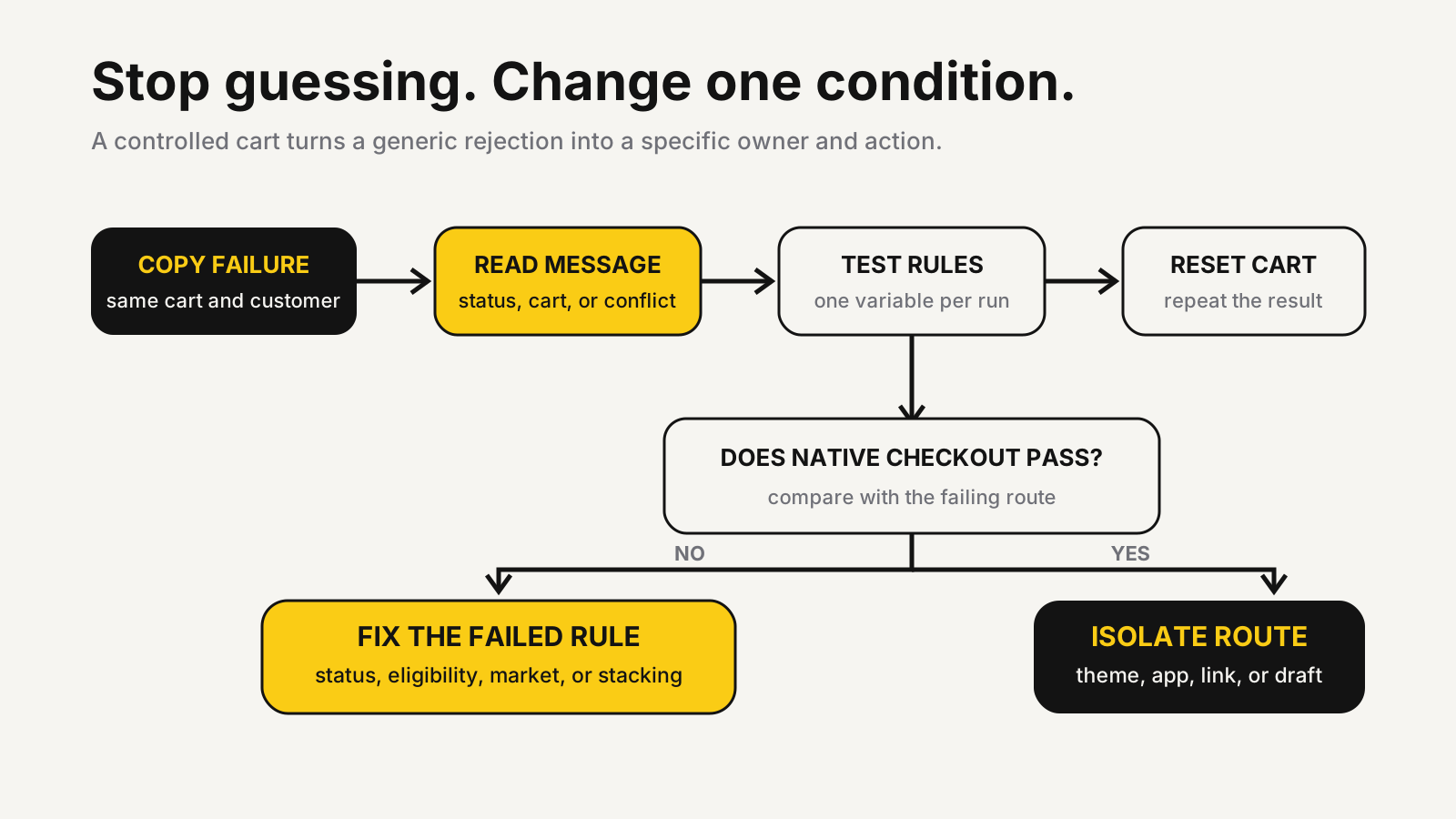
Do not disable every automatic offer at once. Remove one competing discount, reset the cart, and retest. If the code begins working, inspect both offers’ reciprocal combination settings and calculate the resulting price before enabling the pair again.
Draft orders, links, themes, and apps
Draft orders follow different rules. Shopify’s draft-order discount documentation says customers cannot apply codes at checkout from a draft invoice or link by default. The merchant must enable that option for each draft. Shipping codes and Buy X get Y codes are not supported on draft orders.
Shareable links have their own boundary. Shopify says a native shareable discount link carries one active discount, and links for codes created by third-party apps cannot be generated from Shopify Admin. Verify the destination product qualifies and that redirects preserve the intended path.
For a cart-page field, test the native checkout field before editing discount rules. If checkout passes, compare an unpublished clean theme, app embeds, cart drawer scripts, and any app-generated code. Keep screenshots of the discount configuration and both outcomes. That evidence gives a theme or app developer a reproducible failure instead of a vague support ticket.
A release test for every promotion
Run a small acceptance matrix before email, ads, or influencer links go live. Include an eligible cart, an ineligible product, a cart just below the minimum, an eligible customer, an excluded customer, every target market, mobile checkout, and each intended combination. Also test the code’s shareable link and the route customers will actually follow.
For every passing case, record the expected subtotal, discount label, final discount, and shipping result. For every failing case, record the customer-facing message. A promotion is ready only when the failures are intentional and the passing carts match the promised offer.
The Shopify conversion audit checklist helps extend that test beyond discount logic to cart clarity, mobile usability, and checkout continuity.
Test the offer before paid traffic arrives
MlabsGrowth can trace discount, cart, theme, market, and checkout failures, then turn the fix into a repeatable launch test for future campaigns.
Fix Shopify offer and checkout conversion or browse all MlabsGrowth services.
Sources
- Shopify Help Center, Discount codes FAQ, retrieved 2026-10-27; no publication date shown.
- Shopify Help Center, Combining discounts, retrieved 2026-10-27; no publication date shown.
- Shopify Help Center, Discounts and gift cards in Markets, retrieved 2026-10-27; no publication date shown.
- Shopify Help Center, Adding discounts to draft orders, retrieved 2026-10-27; no publication date shown.
- Shopify Help Center, Managing and editing your discounts, retrieved 2026-10-27; no publication date shown.
- Shopify Community, Discount code not working - “Enter a valid discount code”, opened 2026-10-27; thread started 2023-04-03.
