ChatGPT Ads for Shopify connects a merchant’s product catalog, store updates, and commerce events with OpenAI’s advertising system. It gives ecommerce brands a new way to reach shoppers while they compare options and make decisions inside a conversation.
The channel is new, and the details are changing quickly. On 16 September 2026, OpenAI introduced the Shopify app for US merchants and announced an international launch in supported ChatGPT Ads markets for 23 September. Availability still depends on the advertiser’s country, account, product category, and current rollout status.
This guide explains what the integration does, how it differs from organic product discovery, how to set it up, and how to measure it without confusing attributed revenue with profit.
Key takeaways
- OpenAI introduced its Shopify advertising integration on 16 September 2026.
- Paid ChatGPT Ads and organic Shopify product discovery are separate systems.
- The app syncs catalog data and commerce events through OpenAI Pixel for Shopify.
- Start with clean product data, reliable measurement, and a controlled test budget.
Platforms in this guide
 ChatGPT
 Shopify
 Google Analytics
What is ChatGPT Ads for Shopify?
On 16 September 2026, OpenAI announced Shopify as its first ecommerce integration for ChatGPT Ads. The app connects a Shopify catalog and measurement tools to Ads Manager, allowing eligible merchants to create product campaigns and review performance with less manual feed setup.
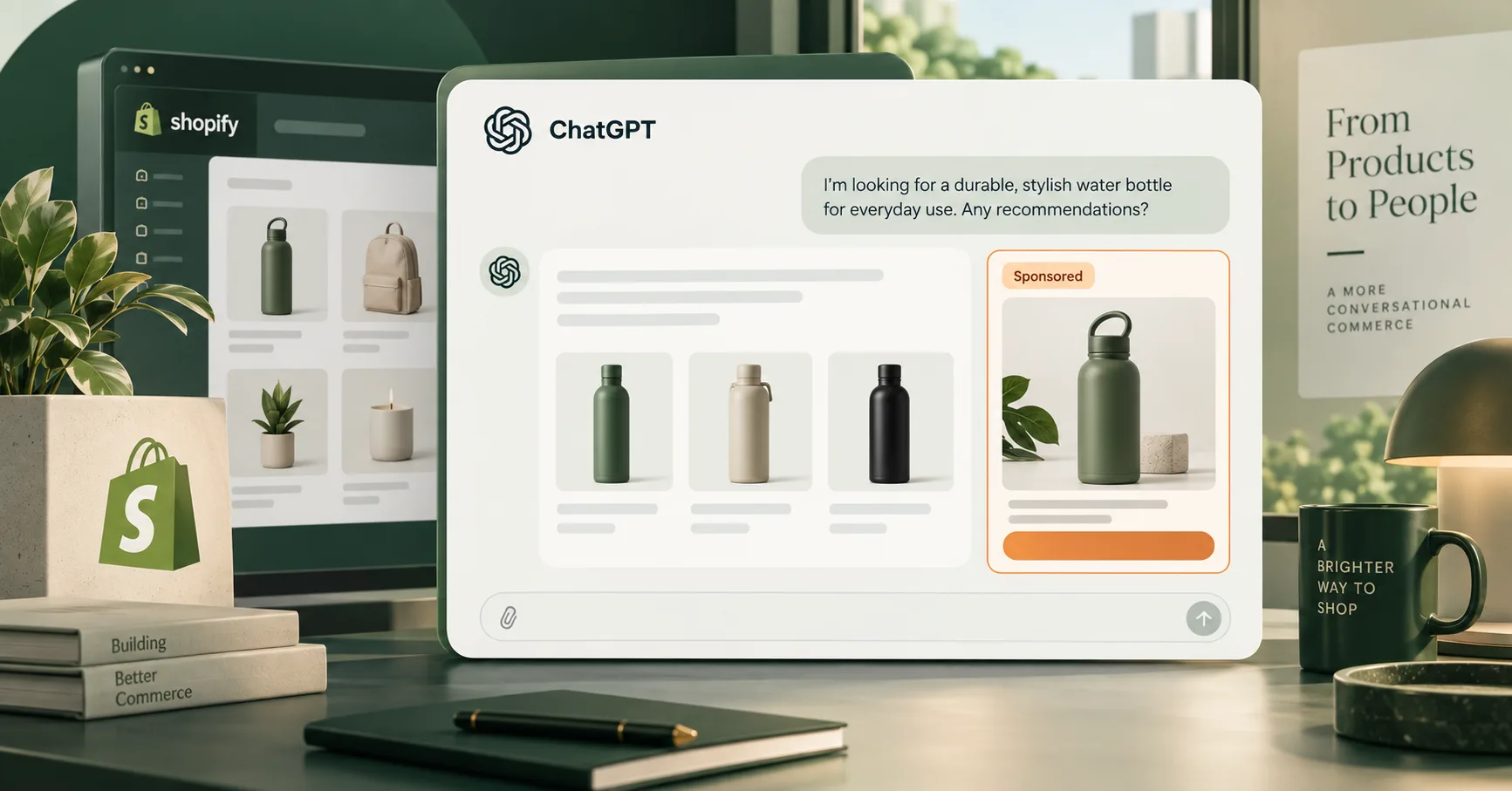
ChatGPT Ads appear below an organic ChatGPT response. OpenAI’s advertiser guide to ads in ChatGPT says each ad can include an advertiser name, favicon, headline, description, landing page, and image. Ads remain labeled and separate from the answer.
That placement changes the context of the click. A shopper may be comparing materials, looking for a gift, or narrowing products by budget when the ad appears. The ad still needs a relevant product, clear creative, and a landing page that answers the buying question.
OpenAI’s announcement, Reimagining advertising with AI, also introduced Sponsored Agents and new creative tools. Those broader features should not be treated as guaranteed capabilities inside every Shopify advertising account.
Availability by country and account
As of 21 September 2026, OpenAI’s setup documentation describes the Shopify integration as available to Shopify customers in the United States. OpenAI announced that the app would expand internationally on 23 September in markets where ChatGPT Ads are supported, so merchants should verify live availability before planning a launch.
OpenAI maintains a current Ads Manager availability list. The legal entity being billed must be based in an available country for self-service access. Account creation and self-service availability are separate, and a country can remain unsupported even when a merchant sells to customers elsewhere.
There are four checks to make before installation:
- Confirm that Ads Manager supports the advertiser’s legal entity country.
- Confirm that the Shopify app is available in that market.
- Review whether the products comply with OpenAI’s ad policies and commerce policies.
- Confirm that the team member installing the app can manage Shopify apps and the Ads Manager account.
International availability can change after publication. Treat OpenAI’s country list and the Shopify App Store listing as the source of truth, not a third-party country table.
How are ChatGPT Ads different from organic product discovery?
Shopify now supports two distinct ChatGPT paths: paid advertising through ChatGPT Ads and organic discovery through Shopify Catalog. Shopify states that eligible stores can already make products discoverable in ChatGPT without buying ads, while ad campaigns require Ads Manager, campaign settings, budget, and measurement. Our Shopify SEO for AI search guide explains how to prepare that organic product-data path for ChatGPT and Google AI Mode.
| Area | ChatGPT Ads for Shopify | Shopify Catalog and ChatGPT discovery |
|---|---|---|
| Placement | Clearly labeled paid ad | Organic product suggestion or discovery result |
| Commercial model | Advertiser pays for impressions or valid clicks | Shopify says there is no separate fee for selling through ChatGPT discovery |
| Primary setup | ChatGPT Ads app, Ads Manager, product feed, Pixel | Eligible products, Shopify Catalog access, complete policies and product data |
| Checkout | Merchant landing page or Shopify storefront | Merchant’s online store checkout in an in-app browser or new tab |
| Control | Campaign, budget, product selection, targeting, creative | Product eligibility and data access; the AI channel decides relevance and ranking |
| Reporting | Ads Manager and connected Shopify analytics | Shopify’s agentic storefront reporting where available |
Shopify’s Selling on ChatGPT documentation describes ChatGPT as a discovery-focused referrer. Eligible customers pay on the merchant’s own online store checkout, so the existing brand experience, payment methods, and checkout setup still matter.
The distinction carries into reporting. Organic ChatGPT referrals should not be counted as paid-ad performance; paid campaigns should use their own UTMs, connected conversion source, and campaign naming convention.
A useful operating model: treat organic AI discovery as a product-data program and ChatGPT Ads as a media-buying program. Both depend on accurate catalog information, but only the second adds auction costs, campaign budgets, and paid attribution.
Inside the Shopify integration
OpenAI’s setup guide lists 3 connected data groups: product inventory and catalog information, store updates that keep product information current, and eligible commerce events sent through OpenAI Pixel for Shopify. These inputs support product-ad creation, campaign optimization, and performance reporting.
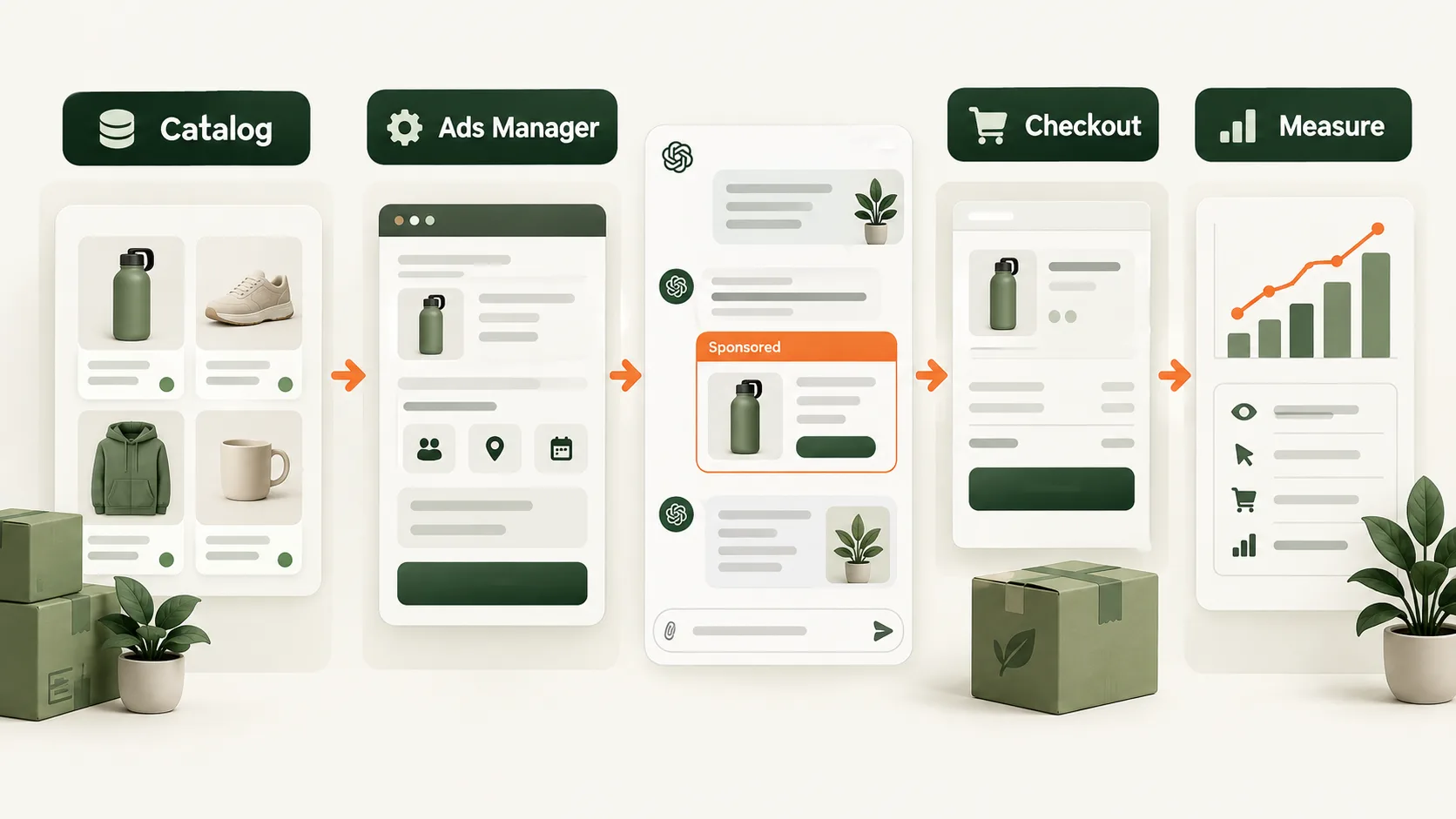
The connection follows a simple sequence:
- Catalog: Shopify supplies active product information and inventory for product ads.
- Campaign: The merchant selects products, an objective, budget, targeting, and an optimization event.
- Placement: ChatGPT may display an eligible sponsored result below a relevant response.
- Checkout: The visitor reaches the selected product or website destination.
- Measurement: OpenAI Pixel for Shopify sends eligible commerce events to Ads Manager.
This is not a closed reporting loop by default. A campaign can show revenue while producing weak contribution after product cost, discounts, shipping, returns, and advertising spend. Use the unit economics guide and free unit economics calculator to evaluate the order after acquisition cost.
Store preparation before the first campaign
Shopify lists at least 7 product-data areas that influence AI discovery. They are title, description, images, organization, barcode, variants and option names.
Paid product ads also depend on accurate catalog data. Clean the feed before sending traffic rather than using advertising to compensate for weak product information.
1. Fix the product record
Use a title a shopper can understand without internal abbreviations. The opening description should state what the product is, who it suits, the main differentiators, and any material limitation. Keep prices, variants, availability, and images current.
Shopify’s own advice on optimizing products for AI platforms recommends complete policies and accurate structured product information. If data lives in metafields or custom structures, review Shopify Catalog mapping before assuming the correct source is syndicated.
2. Match the landing page to the conversation
A ChatGPT user may arrive with a detailed requirement. The landing page should confirm the product’s relevant features near the top, then make delivery, returns, total cost, and variant selection easy to understand.
Use the site’s Shopify conversion audit checklist to review the path on mobile and desktop. Fix broken variant states, unexpected costs, or unclear shipping information before increasing spend.
3. Establish the financial baseline
Record current conversion rate, average order value, contribution per retained order, return rate, and new-customer acquisition cost. Then decide the maximum test spend the business can afford without relying on projected revenue.
The marketing budget calculator can model spend and ROAS scenarios. Its result is a plan, not a forecast. Compare paid revenue with contribution margin because ROAS alone ignores product and fulfilment costs.
Connecting Shopify and launching a campaign
OpenAI’s current Shopify setup guide uses 6 core connection actions: install the app, connect an Ads Manager account, select or create the OpenAI Pixel, enable eligible commerce events, wait for the catalog sync, and create product ads from the synced feed.
Before connecting
Prepare the following:
- An active Shopify store.
- An active ChatGPT Ads Manager account, or the information needed to create one.
- Shopify permission to install and manage apps.
- Permission to manage the selected Ads Manager account.
- The business website, industry, country, currency, and time zone.
- Approved products, landing pages, creative, budget, and measurement owner.
Connection steps
- Install or open ChatGPT Ads for Shopify.
- Select Connect Account and choose the correct Ads Manager account.
- Select or create OpenAI Pixel for Shopify.
- Connect the Pixel and allow eligible events to flow to Ads Manager.
- Wait for the product inventory to finish syncing.
- Check that active products, prices, images, and availability appear correctly.
- Create a campaign, then choose the objective, budget, targeting, and ad type.
- Select all products, a single product, or a website campaign, depending on the goal.
- Review the ad preview before launching.
Do not publish the first campaign immediately after the connection succeeds. Test the destination URL, Pixel status, product availability, mobile page, policy pages, and checkout. A connected feed can still contain unsuitable products or outdated copy.
Which campaign objective should you choose?
OpenAI currently offers 3 campaign objectives: Views, Clicks, and Conversions. Views use CPM buying, Clicks use CPC buying, and Conversions can optimize toward a supported event using optimized CPC or CPM billing. OpenAI notes that conversion campaigns are not billed per conversion.
| Objective | Billing basis | Best starting use | Main caution |
|---|---|---|---|
| Views | Per 1,000 impressions | Controlled awareness test | Reach does not prove purchase intent |
| Clicks | Per valid click | Landing-page traffic and message testing | A low CPC can still produce weak orders |
| Conversions | Valid clicks or impressions, optimized to an event | Accounts with reliable event tracking | Weak or rare events can make evaluation difficult |
OpenAI says a campaign can use a total budget or an average daily budget. Its campaign creation guide explains that daily delivery can move above or below the selected amount, subject to the platform’s stated daily and 7-day controls.
For a first ecommerce test, choose one business question. For example: can a small set of high-margin products acquire retained orders within the brand’s contribution limit? That produces a clearer answer than launching the whole catalog across multiple objectives.
Measurement in three reporting layers
OpenAI Ads Manager currently reports at least 7 core measures: impressions, clicks, spend, CTR, average CPC, average CPM, and conversions. Its reporting guide says attributed conversions may take 24 to 48 hours to appear, so same-day reports should not drive large budget decisions.
OpenAI’s measurement documentation also supports 7-, 14-, or 30-day click-through reporting windows and either a disabled or 1-day view-through window. Changing the reporting window changes reporting, not bidding or billing.
Use three reporting layers:
- Delivery: impressions, reach where available, spend, and product eligibility.
- Engagement: clicks, CTR, average CPC, landing-page sessions, and product-page behavior.
- Business outcome: orders, sales, cost per acquisition, returns, contribution after ads, and new-customer quality.
Add static UTM parameters to every landing-page URL. Keep source, medium, campaign, and content values consistent. OpenAI’s basic advertiser guide confirms that static tracking parameters persist on ad clicks and can be read by existing analytics tools.
Expect platform totals to differ. OpenAI uses its selected attribution rules, while Shopify and another analytics tool may use different windows, timestamps, consent conditions, and deduplication. Reconcile the definitions before calling one report wrong.
Privacy and policy checks
OpenAI states that advertisers do not receive users’ chats, chat history, memories, names, emails, precise locations, IP addresses, or sensitive information. Its ads privacy guide also says ads remain separate from answers and that users control ad personalization.
Conversion measurement still requires care. OpenAI Pixel and the Conversions API can send conversion events. OpenAI’s conversion measurement guide says businesses should provide clear information about data collection and obtain consent where required by law.
Before launch:
- Update the privacy notice to describe the measurement tools actually used.
- Confirm the consent mechanism fits the markets being targeted.
- Send only permitted event data.
- Check product and creative eligibility against current ad policies.
- Avoid copy that imitates ChatGPT’s interface or suggests an ad is part of the answer.
- Keep promotional claims specific, supportable, and consistent with the landing page.
This guide is operational information, not legal advice. Privacy, advertising, and consumer-protection obligations vary by country and product category.
A first 30-day test, stage by stage
A 30-day test should move through 4 stages: readiness, connection, controlled launch, and decision. The goal is a usable operating answer, not forced scale from an early channel before enough data exists.
Days 1-5: establish readiness
- Select a small product group with reliable stock and enough contribution margin.
- Audit product data, policy pages, landing pages, and checkout.
- Record baseline conversion, order value, returns, and contribution.
- Define one primary conversion event and campaign naming standard.
Days 6-10: connect and validate
- Install the app and connect the correct Ads Manager account.
- Connect OpenAI Pixel for Shopify.
- Verify catalog sync, event status, destination URLs, and UTMs.
- Capture screenshots of the setup and record who owns each connection.
Days 11-24: run a controlled campaign
- Use one objective and one clear product set.
- Hold the budget within the approved test limit.
- Check delivery and broken experiences daily without resetting the campaign repeatedly.
- Review product availability, landing-page behavior, and attributed orders.
Days 25-30: decide
- Allow for the platform’s 24- to 48-hour conversion-reporting delay.
- Reconcile Ads Manager, Shopify, and analytics data.
- Calculate contribution after advertising and returns.
- Decide whether to keep, refine, pause, or expand the test.
Whichever way the decision goes, keep paid ads separate from organic ChatGPT discovery in both strategy and reporting: the app makes setup easier, but it does not pick the right product, answer the shopper’s question or protect your margin.
Make the store ready before buying the traffic
MlabsGrowth can review the product page, catalog path, measurement assumptions, and Shopify conversion journey before a larger campaign rollout.
Improve the Shopify pages your ads land on or review the AI marketing workflow service.
Frequently asked questions
Can Shopify stores advertise in ChatGPT?
Yes. As of September 2026, eligible Shopify merchants can connect a store to ChatGPT Ads Manager through the ChatGPT Ads for Shopify app. OpenAI launched the app for US merchants on September 16 and announced an international rollout for supported ChatGPT Ads markets on September 23.
Are ChatGPT Ads the same as Shopify Agentic Storefronts?
No. ChatGPT Ads are paid placements managed through Ads Manager. Agentic Storefronts and Shopify Catalog support organic product discovery in AI channels. A Shopify merchant can therefore prepare for organic discovery and paid campaigns as two separate acquisition paths.
What does the ChatGPT Ads for Shopify app sync?
The app syncs product inventory and catalog information, relevant store updates, and eligible commerce events through OpenAI Pixel for Shopify. OpenAI says the connection reduces manual setup, but merchants should still validate the feed, Pixel connection, campaign settings, and store analytics before launch.
How are ChatGPT Ads campaigns billed?
OpenAI currently offers 3 objectives: Views, Clicks, and Conversions. Views use CPM billing, Clicks use CPC billing, and conversion campaigns can use optimized click or impression billing. Conversion campaigns are not billed per conversion. Review the current options inside Ads Manager before budgeting.
How should a Shopify brand measure ChatGPT Ads?
Track impressions, clicks, spend, CTR, average CPC, average CPM, attributed conversions, order sales, and contribution margin. OpenAI says attributed conversions can take 24 to 48 hours to appear, so avoid judging a new campaign from same-day reporting alone.
Source notes
- OpenAI, Reimagining advertising with AI, published 2026-09-16, retrieved 2026-09-21.
- OpenAI Help Center, Set up ChatGPT Ads for Shopify, retrieved 2026-09-21.
- OpenAI Help Center, Ads Manager Availability, retrieved 2026-09-21.
- OpenAI Help Center, Ads in ChatGPT: The Basics, retrieved 2026-09-21.
- OpenAI Help Center, Create Campaigns for ChatGPT Ads, retrieved 2026-09-21.
- OpenAI Help Center, Measure Results, retrieved 2026-09-21.
- OpenAI Help Center, Conversion Measurement, retrieved 2026-09-21.
- OpenAI Help Center, Ads in ChatGPT, retrieved 2026-09-21.
- OpenAI, Ad policies, retrieved 2026-09-21.
- OpenAI, Commerce policies, retrieved 2026-09-21.
- Shopify Help Center, Selling on ChatGPT, retrieved 2026-09-21.
- Shopify Help Center, Shopify Catalog and product discovery for agentic storefronts, retrieved 2026-09-21.
- Shopify Help Center, Optimizing your products for AI platforms, retrieved 2026-09-21.
