Shopify back in stock notifications should capture demand only when a sold-out variant is expected to return. Use a preorder when supply and dispatch timing are dependable; use an alert when timing is uncertain; use a clear sold-out state when the item is finished. The choice matters more than the app.
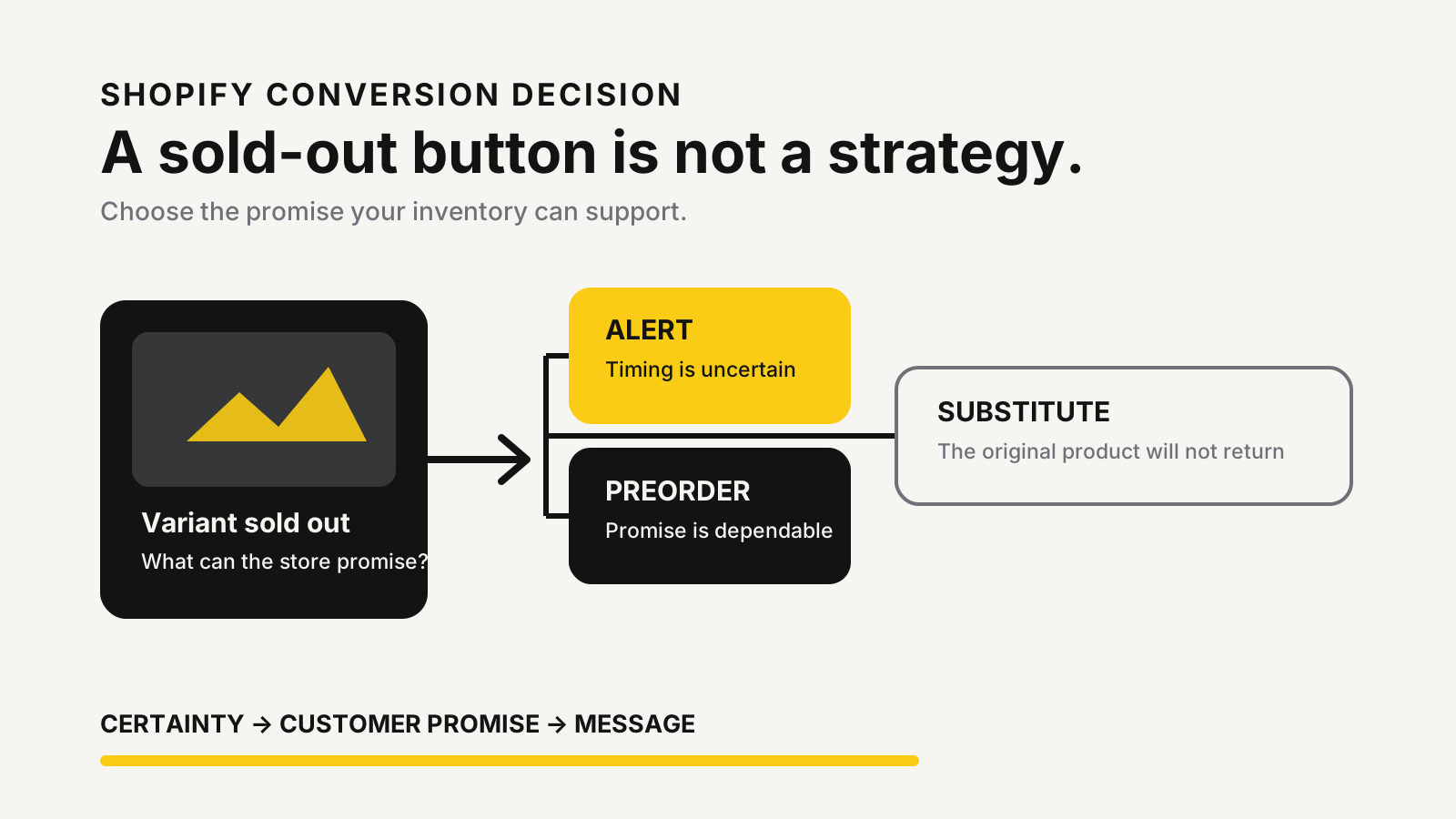
The short decision rule
Choose a preorder only when you can make a credible delivery promise. Choose an alert when stock will return but timing or quantity remains uncertain. If the product is discontinued, say so and offer a relevant substitute instead of collecting an email you cannot use honestly.
Alert, preorder or sold-out page: choose by certainty
These options solve different problems. A back-in-stock alert records interest without taking payment. A preorder accepts an order before the item is available. A sold-out page closes the loop and helps the shopper move to another product.
Shopify’s pre-order documentation says merchants need a pre-order app and may collect full, partial or no payment, depending on the option offered. Shopify also warns merchants to follow the laws that apply to their business and customers. That makes preorder an operational promise, not merely a different button label.
Use this rule:
| Situation | Best default | Why |
|---|---|---|
| Confirmed incoming stock and a dependable dispatch window | Preorder | The shopper can commit while the store communicates timing clearly. |
| Restock planned but date or quantity uncertain | Back-in-stock alert | The store captures interest without promising fulfilment. |
| Product may return, but the decision is not made | Waitlist with cautious wording | The message should not imply a guaranteed restock. |
| Product is discontinued | Sold-out state plus substitute | Collecting demand for a product that will not return creates frustration. |
The stock setting also matters. Shopify defines an item as out of stock when tracked inventory is at zero or below, and customers cannot purchase it by default. The platform’s selling out-of-stock products guidance explains that “continue selling” changes this behavior and can be affected by fulfilment locations. Turn it on deliberately, not as a shortcut around an alert setup.
Shopify back in stock notifications need variant-level logic
A notification should attach to the exact product variant the shopper requested. A black medium shirt returning does not satisfy someone waiting for a blue large shirt. If the tool stores demand only at product level, the message can be technically delivered and still be wrong.
Check where the signup record lives, what identifies the variant, and which inventory state triggers release. Shopify lists third-party Flow connectors for back-in-stock apps with events such as a subscription being created, a variant’s demand changing or an item returning to stock. Those triggers come from connected apps; they don’t prove that your theme, audience and message path are working together.
Multi-location stores need another check. Shopify notes that stock at a location that does not fulfil online orders might not make the product available on the online store. A warehouse adjustment can therefore look like a restock in an admin view while the storefront variant remains unavailable.
Keep the trigger narrow:
- Match the subscriber to a variant, not just a product.
- Require sellable online inventory at an eligible fulfilment location.
- Suppress discontinued, draft and unavailable-market variants.
- Decide whether a tiny restock should message the whole waitlist or a controlled segment.
- Prevent repeated sends when inventory moves around during receiving or reconciliation.
That final point connects inventory and conversion. Clean counts reduce false alerts. The inventory reorder point guide helps prevent avoidable stockouts, while the inventory planning calculator turns demand and lead time into a replenishment trigger.
A practical decision matrix
Choose the setup by scoring certainty, customer commitment and operational risk. Don’t begin with a list of apps. Begin with what the store can promise.
| Decision factor | Alert | Preorder | Sold-out plus substitute |
|---|---|---|---|
| Restock date is uncertain | Strong fit | Weak fit | Useful if return is unlikely |
| Incoming quantity is uncertain | Strong fit | Risky | Useful for discontinued items |
| Payment should be taken now | No | Yes | No |
| Demand signal is the main goal | Yes | Secondary | No |
| Fulfilment promise can be stated clearly | Helpful, not required | Required | Not required |
| Customer should choose an alternative now | Possible | Usually no | Strong fit |
Consider an illustrative example: a variant has an alert list of 240 shoppers, but only 60 units arrive. If the store messages the entire list at once, demand can exceed supply by 180 units. Those figures are illustrative, not a benchmark. The useful decision is whether to stagger the send, reserve stock, cap the audience or accept that many shoppers will see another sold-out page.
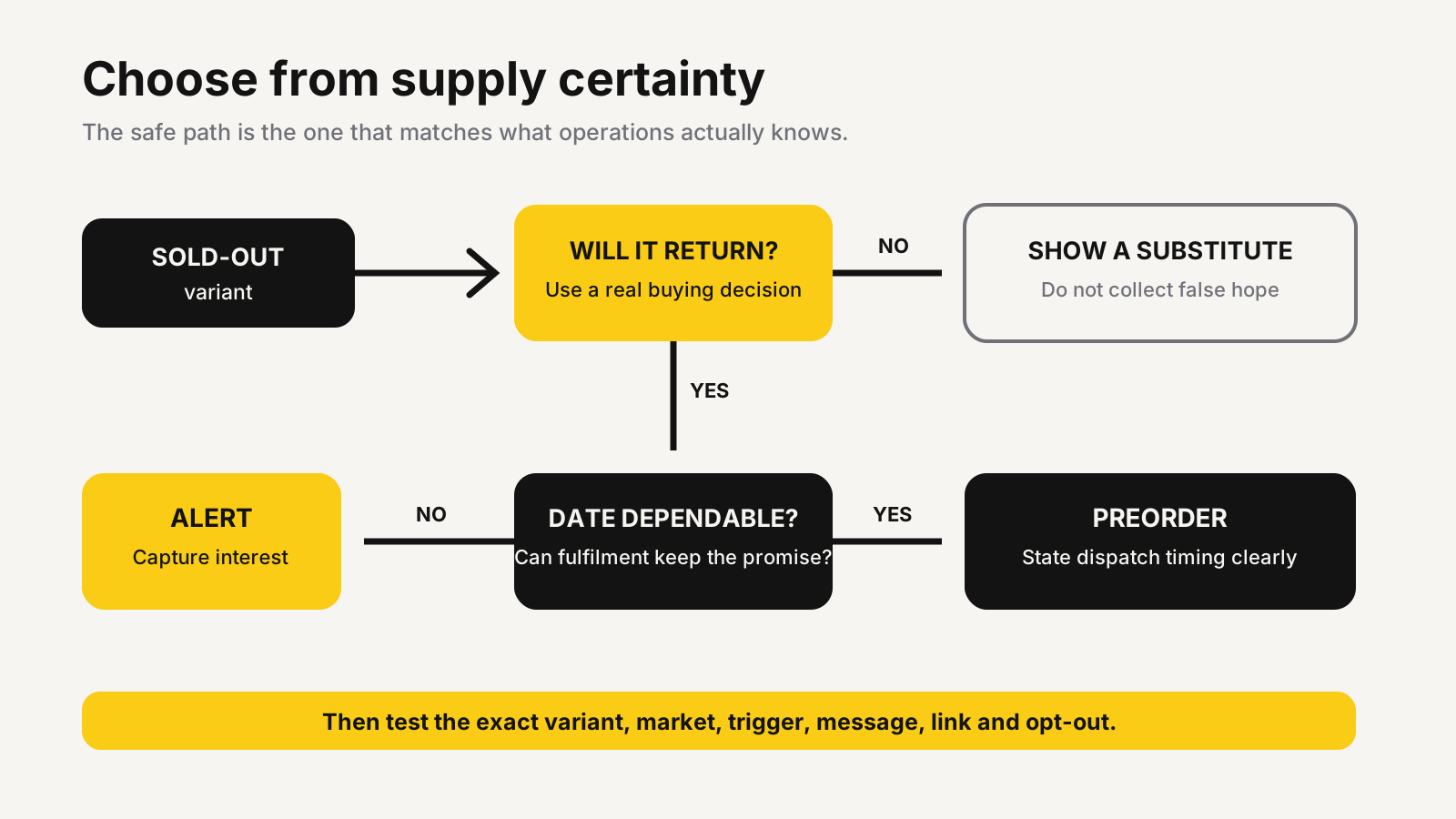
The tool should expose enough information to make that choice: waitlist size by variant, eligible inventory by market, send status, bounce or suppression state, and purchases attributed without claiming that every purchase was caused by the message.
The QA test that prevents silent failures
Most setup guides stop after the button appears. That is too early. A working button proves only that the storefront rendered a form.
Run the path with a real test variant and an email address you control:
- Set the variant to unavailable in the same market and theme customers use.
- Confirm the alert button appears only for the unavailable variant.
- Submit the form and verify the record contains the correct variant and market.
- Check the confirmation message and any consent language.
- Add sellable inventory at a location that fulfils online orders.
- Verify that one message is sent, its product link opens the right purchasable variant, and unsubscribe works.
- Move inventory down and up again to confirm the system does not create an accidental duplicate send.
Test mobile, desktop and any active page builder. Then repeat the test after a theme publish, app update or inventory-routing change. A signup button that collected an address but produced no customer email is not a working alert. End-to-end evidence is the answer.
Track four operating outcomes: signup completion, message delivery, return-to-product sessions and completed orders from those sessions. Treat each metric as a separate stage. A weak purchase result might come from low stock, a late message, the wrong variant link or a product page that still fails to convert.
For the last problem, use the Shopify conversion audit checklist to inspect product-page clarity, trust and mobile friction around the returning traffic.
Regional consent rules change the message
A requested restock notice can become direct marketing if it adds promotions, cross-sells or ongoing campaign permission. Keep the signup promise specific, store proof of consent, identify the sender and provide a working opt-out. Then review the markets where recipients live.
The rules are not identical. The US Federal Trade Commission’s CAN-SPAM compliance guide requires accurate sender information, a valid postal address and a clear opt-out for commercial email. Canada’s CRTC says commercial electronic messages generally need consent, sender identification and an unsubscribe mechanism, with requests honoured within ten business days.
For the UK, the Information Commissioner’s Office says electronic marketing to individuals generally needs specific consent unless the limited soft opt-in applies; its electronic mail marketing guidance also requires an opt-out opportunity. Australia’s ACMA says commercial messages need permission, sender identification and an unsubscribe path, and its spam compliance guidance says unsubscribe requests must be completed within five business days.
India’s Digital Personal Data Protection Rules explanatory note says notices should describe the personal data collected and its purpose, and make withdrawal as easy as giving consent. For the EU and Southeast Asian markets, rules can vary by country and channel. Treat the strictest applicable requirement as the launch baseline and get local legal advice where the message design is unclear.
Keep the restock notification focused on the requested item. If you also want newsletters or promotional SMS, collect that permission separately where required.
Test the sold-out journey before the next restock
MlabsGrowth can map the variant, inventory, message and product-page path so paid traffic does not end at a broken alert or an unsafe promise.
Improve your Shopify sold-out and restock conversion path or browse all MlabsGrowth services.
Frequently asked questions
Does Shopify send back-in-stock notifications automatically?
Not as a universal native storefront feature. Shopify documents third-party Flow connectors that can expose restock triggers, but the customer signup, audience storage and message delivery depend on the app or marketing platform you configure. Test the full path on your actual theme before relying on it.
Should a sold-out product use an alert or a preorder?
Use an alert when the restock date or quantity is uncertain. Use a preorder only when supply, payment handling and the promised dispatch window are dependable. Keep a clean sold-out state when the product will not return, then direct shoppers to a genuine substitute.
What should a back-in-stock test cover?
Test the exact variant, every active storefront market, the signup confirmation, the inventory event, the outgoing message, the destination link and the unsubscribe path. Also verify that a small restock cannot notify more shoppers than the quantity you are prepared to sell.
Sources
- Shopify Help Center, Pre-orders, retrieved 2026-10-22.
- Shopify Help Center, Selling out of stock products, retrieved 2026-10-22.
- Shopify Help Center, Apps that work with Shopify Flow, retrieved 2026-10-22.
- Federal Trade Commission, CAN-SPAM Act: A Compliance Guide for Business, retrieved 2026-10-22.
- Canadian Radio-television and Telecommunications Commission, CASL Guidance on Implied Consent, retrieved 2026-10-22.
- Information Commissioner’s Office, Electronic mail marketing, retrieved 2026-10-22.
- Australian Communications and Media Authority, Spam compliance alerts, retrieved 2026-10-22.
- Ministry of Electronics and Information Technology, Explanatory note to Digital Personal Data Protection Rules, 2025, retrieved 2026-10-22.
