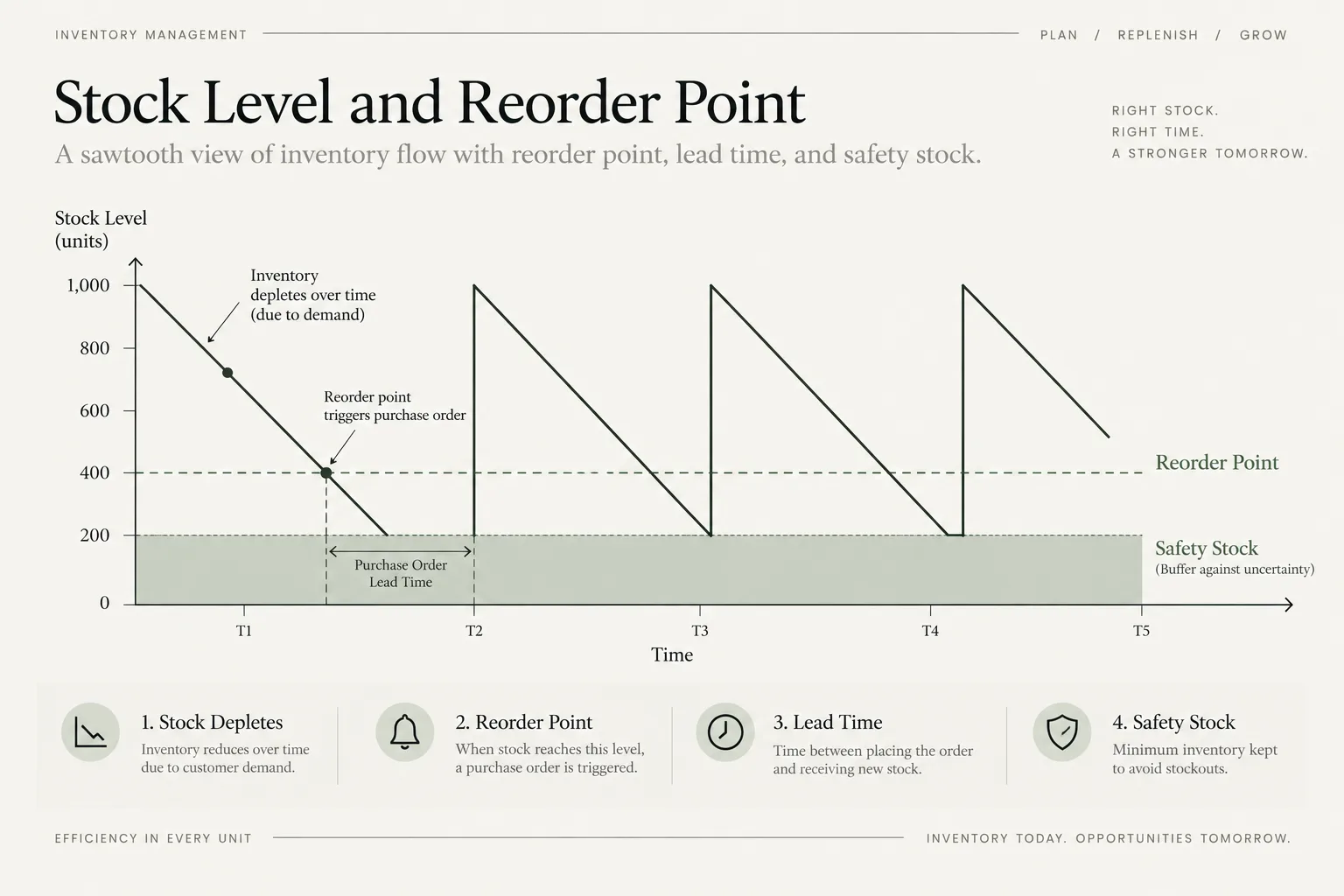
An inventory reorder point is the stock level that tells you when to place the next purchase order. The basic calculation covers expected demand during supplier lead time plus a safety buffer. It helps a business reorder early enough to reduce stockouts without buying simply because a shelf looks low.
The formula is simple. The operating work is choosing reliable sales velocity, lead time, and safety stock for each SKU, and treating that safety stock as a service-versus-cash decision rather than free insurance.
A single average applied to every product can lock cash into slow stock while fast sellers still run out.
What is an inventory reorder point?
The reorder point is the on-hand or inventory-position level at which a replenishment order should be placed. It is designed so the next shipment arrives before available stock is exhausted, with a buffer for ordinary uncertainty.
Shopify’s Reorder Point Formula: A Retailer’s Guide expresses the formula as sales velocity multiplied by lead time, plus safety stock. When safety stock is entered as days, the same relationship becomes daily sales multiplied by lead time plus buffer days.
The trigger level and the quantity to purchase are different decisions, a split that inventory planning software also makes. Supplier minimums, case packs, demand forecasts, shelf life, storage, cash, and incoming purchase orders determine how much to buy.
How do you calculate a reorder point?
1. Calculate average daily sales
Average daily sales = units sold in the period / selling daysUse a period that represents the demand you expect during the next replenishment cycle. Exclude unusual stockout days or account for the demand that could not be observed.
2. Measure supplier lead time
Lead time should run from the moment an order can be released until the stock is available to sell. Include supplier processing, production, freight, customs, receiving, quality checks, and put-away where relevant.
3. Add a safety buffer
Safety stock = average daily sales x safety daysReorder point = average daily sales x (lead time days + safety days)Or equivalently:
Reorder point = lead-time demand + safety stockA worked reorder example
A SKU sells 10 units per day on average, the supplier lead time is 14 days, and the business chooses seven safety days.
| Measure | Calculation | Result |
|---|---|---|
| Lead-time demand | 10 x 14 | 140 units |
| Safety stock | 10 x 7 | 70 units |
| Reorder point | 10 x (14 + 7) | 210 units |
When the relevant inventory position reaches 210 units, the business should release a replenishment order under these assumptions.
If current stock is 300 units:
Days to stockout = 300 / 10 = 30 daysThe calculator also shows a simple suggested quantity for a 30-day replenishment cycle. That is a planning convenience, not an economic order quantity.
Confirm minimum order quantities, case packs, available cash, storage, incoming units, and forecast changes.
Which inventory number should trigger the order?
On-hand stock alone can mislead. A more complete inventory position is:
Inventory position = on hand + confirmed incoming - allocated or backordered unitsUse the inventory measure that matches how your operation reserves and receives stock. If 200 units are physically present but 120 are committed to open orders, only 80 may be available. If a confirmed purchase order arrives tomorrow, ignoring it can create a duplicate order.
The free calculator uses current stock and does not sync incoming purchase orders or reservations, so review those items before committing cash. On Shopify, the purchase order reports show which open orders, transfers and receipts are still outstanding.
Choosing safety stock: service versus cash
Safety days are a practical buffer when demand and lead time are fairly stable. More volatile products need a method based on demand and lead-time variability, desired service level, or forecast error.
Increase the buffer when:
- supplier lead time varies materially;
- demand spikes are frequent and costly;
- the item has no substitute;
- a stockout loses customers or stops a wider bundle;
- replenishment opportunities are infrequent.
Reduce or tightly control it when:
- the product is perishable, seasonal, or trend-sensitive;
- storage or financing cost is high;
- the supplier replenishes quickly and reliably;
- the SKU is slow moving or easily substituted.
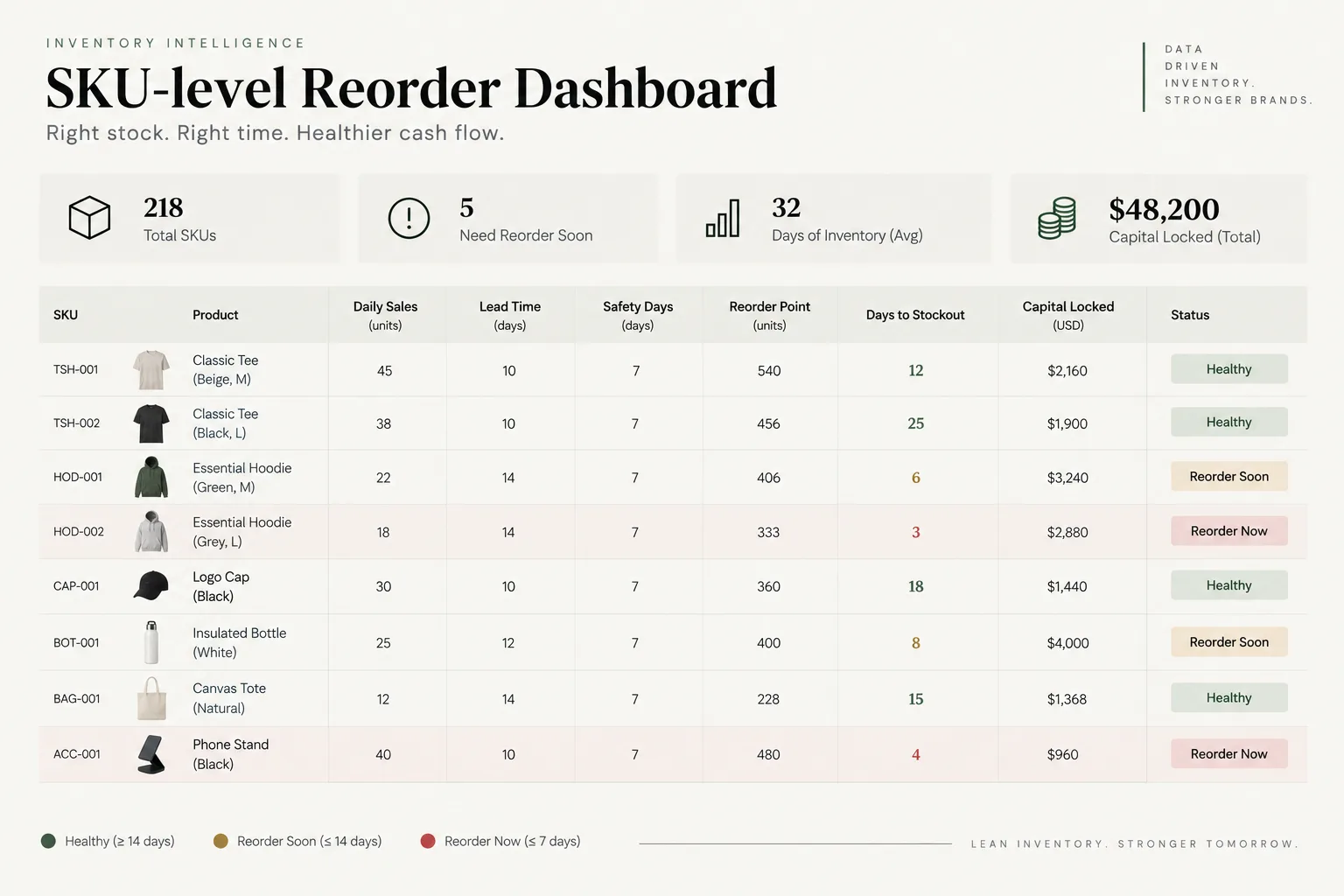
Every extra safety unit ties up cash. Multiply stock by unit cost to see capital locked in the SKU, then use the cash runway guide to evaluate the timing effect.
When seasonality and promotions break the average
Historical average daily sales is a poor predictor when demand is about to change. Use forward-looking daily demand for the lead-time window, and account for planned promotions, holidays, marketplace events, wholesale orders, new listings, price changes, and product launches.
If a promotion begins during lead time, calculate expected demand day by day or use a weighted forecast. Reorder points should also be revised after a structural change, not only at a fixed annual review.
For bundles, component demand may be higher than standalone sales suggest. A product required by several bundles can block them all when it runs out.
Combine the inventory plan with the bundle pricing guide.
Common reorder point mistakes
- Treating reorder point as the quantity to buy.
- Using one sales rate and lead time for every SKU.
- Measuring supplier dispatch time instead of dock-to-available lead time.
- Ignoring incoming, reserved, damaged, or quarantined inventory.
- Using sales from stockout days without correcting suppressed demand.
- Keeping the same buffer through promotions and seasonal peaks.
- Ignoring minimum order quantities, case packs, shelf life, and storage.
- Maximising availability without checking cash tied up in stock.
Calculate reorder points by SKU
A reorder point makes replenishment repeatable: expected lead-time demand plus a deliberate buffer. Calculate it at SKU level, use a complete inventory position, and update it when demand or lead time changes. Then decide order quantity with cash, storage, supplier, and obsolescence constraints in view.
Turn sales velocity and lead time into a reorder trigger
Use the MlabsGrowth Inventory Reorder Point Calculator to model each SKU's reorder point, safety stock, days to stockout, a 30-day suggested quantity, capital locked, and current status.
When stock and order updates live in several tools, our order automation service brings them into one reliable order view.
The calculator works in your chosen currency and assumes constant daily sales. It does not include seasonality, supplier delays, incoming purchase orders, reservations, minimums, or case packs.
Frequently asked questions
What is the reorder point formula?
A simple reorder point is average daily sales multiplied by supplier lead time plus safety days. The same formula can be expressed as lead-time demand plus safety stock.
Is reorder point the same as order quantity?
No. The reorder point is the stock level that triggers an order. Order quantity is how many units to purchase after that trigger and depends on forecast demand, supplier constraints, cash, and storage.
How do you calculate safety stock from safety days?
Multiply average daily sales by the chosen number of safety days. This method is transparent but assumes demand is reasonably stable.
How often should reorder points be updated?
Review fast-moving or volatile SKUs frequently and recalculate whenever sales velocity, supplier lead time, seasonality, promotions, or service targets change materially.
Does the calculator include incoming purchase orders?
No. It uses current stock and constant daily sales. Confirm open purchase orders, reserved stock, supplier minimums, case packs, and seasonal demand before buying.
The bottom line
A reorder point makes replenishment repeatable: expected lead-time demand plus a deliberate buffer. Calculate it at SKU level, use a complete inventory position, and update it when demand or lead time changes. Then decide order quantity with cash, storage, supplier, and obsolescence constraints in view.
Source notes
- Shopify, Reorder Point Formula: A Retailer’s Guide, retrieved 2026-09-19.
- Shopify Help Center, Understanding inventory states, retrieved 2026-10-19.
- Microsoft Learn, Design details: Handling reordering policies (Business Central), updated 2026-06-02, retrieved 2026-10-19.
