A useful Shopify size chart helps a shopper move from a body measurement to the right variant without translating vague labels alone. Build it per product family, show the measuring method beside the table, include the buyer’s local size system, and test the whole interaction on a phone.
Do not treat the chart as a generic image added to every product. Fit, garment measurements, stretch, cut, and regional labels can all change what “M” means.
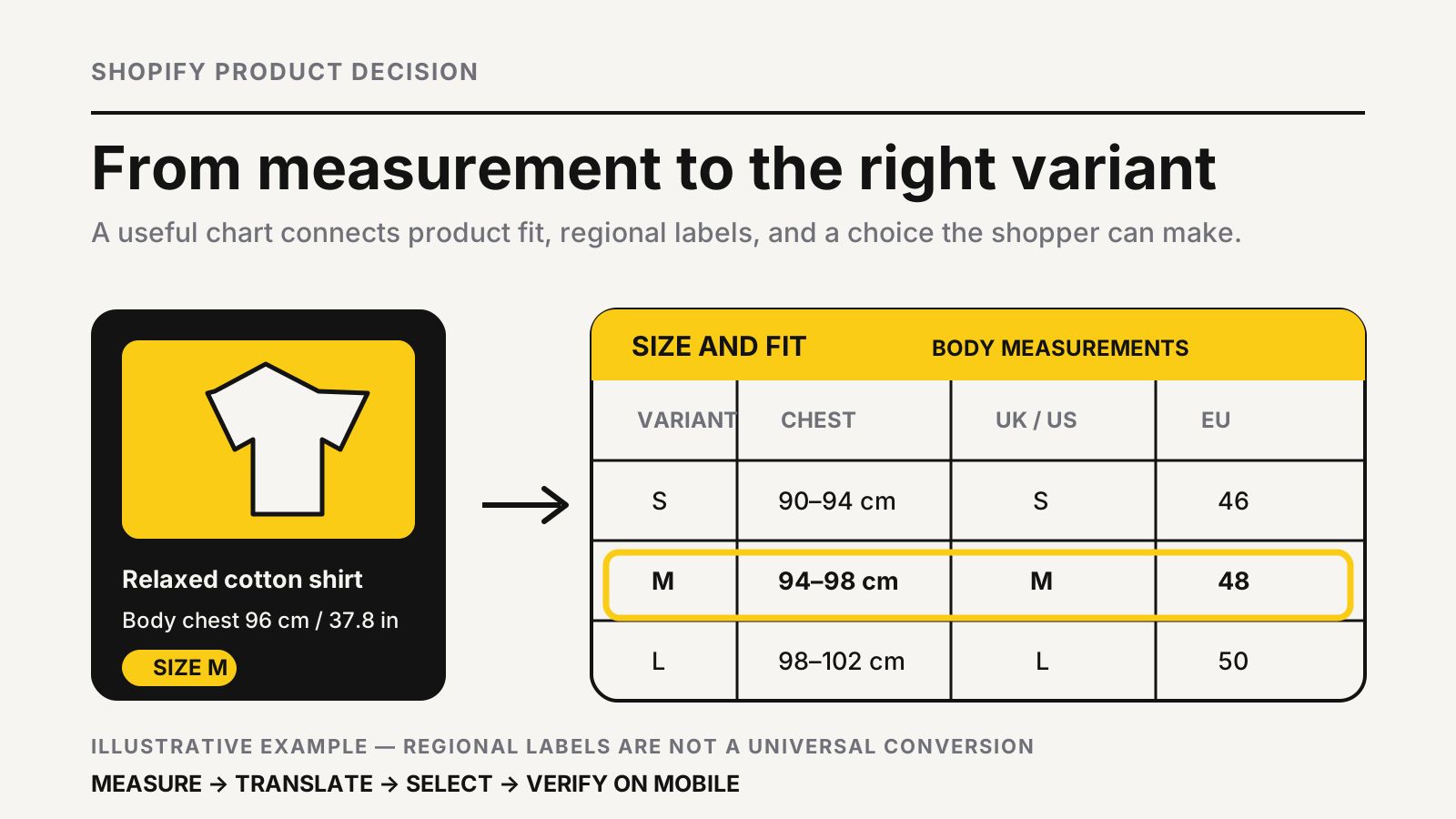
A size chart is a product decision tool
The best chart answers three questions in order: what to measure, how to measure it, and which available variant matches. A grid of S, M, and L values answers only the last question, leaving the shopper to guess whether the table describes a body or the finished product.
Start with the product’s fit logic. A fitted shirt may need chest, waist, shoulder, and garment length. Footwear needs foot length, width guidance, and the sizing system. Rings, helmets, pet harnesses, and furniture covers need their own measurement points. One universal chart is rarely honest enough.
Fit is product-specific.
Keep the chart close to the variant selector. Label it “Size and fit” or “Size chart,” not a vague “More information.” If the choice still feels risky, the cart abandonment guide explains why product-page uncertainty can become checkout drop-off later.
The Shopify size chart decision framework
Choose the simplest implementation that can stay accurate. A single product family with identical measurements can share one page. Products with different blocks, suppliers, age groups, or fits need separate charts. A fit recommender or specialist app becomes useful only when rules depend on several inputs or the catalog is too large to maintain manually.
| Store situation | Best starting point | Main control |
|---|---|---|
| One consistent size system | Theme block or page link | Confirm the table matches every assigned product |
| Several product families | Product metafield with separate pages | Assign the right chart to each product |
| Multiple regional labels | Product chart plus conversion columns | Name the size system above every column |
| Fit depends on several inputs | Tested sizing app | Keep the underlying measurements and fallback visible |
| Made-to-measure product | Measurement form and review step | Validate units, ranges, and customer confirmation |
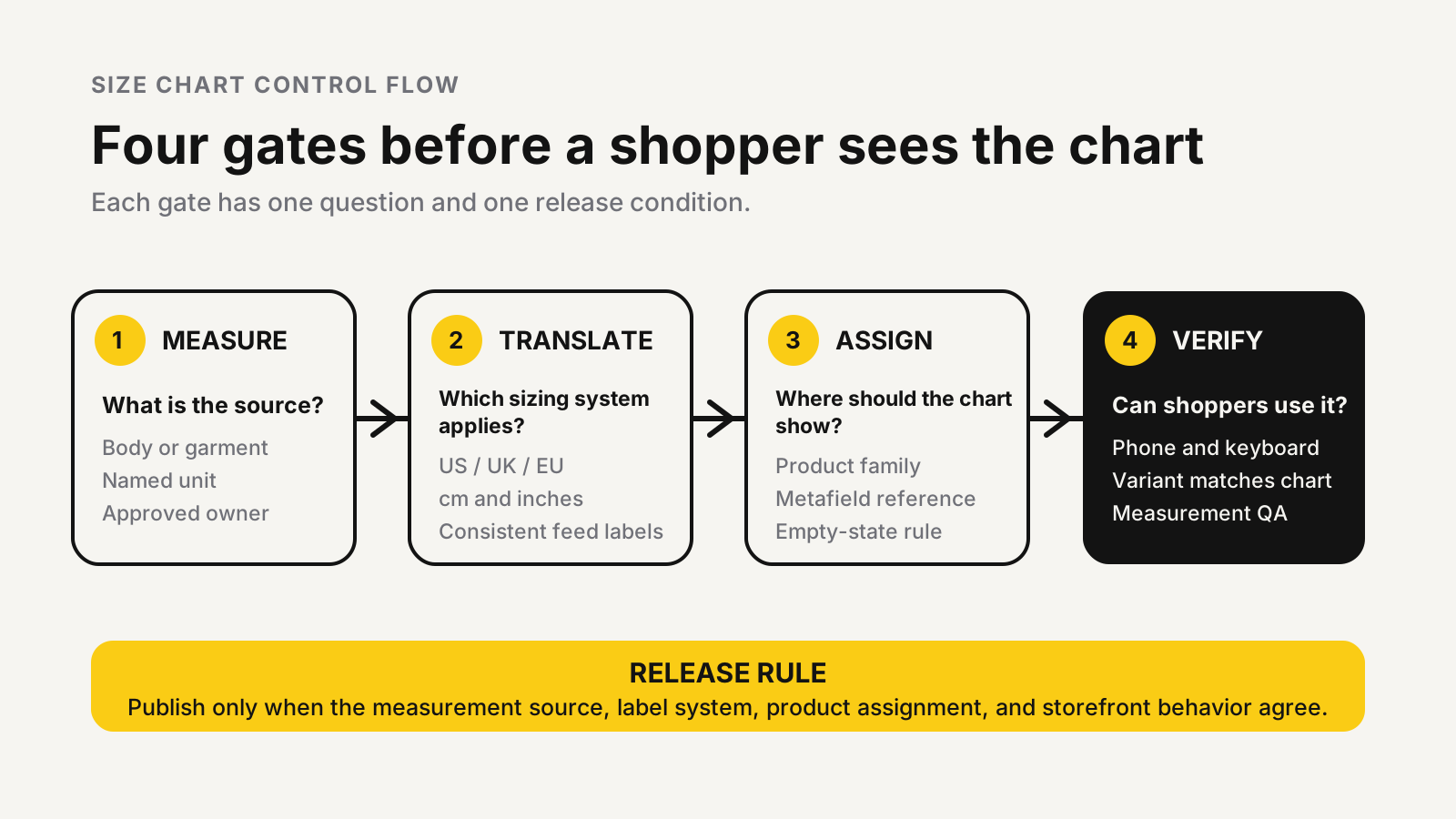
This sequence avoids buying software before the underlying data is ready. First define measurement ownership, then publish the smallest workable interface. The Shopify conversion audit checklist can place size selection inside the wider product-page review.
Build product-specific charts with metafields
Shopify’s pop-up size chart tutorial documents a four-step setup using a page-reference product metafield, a product template, a page containing the chart, and a product assignment. Shopify also confirms that different products can reference different pages, while each product metafield links to only one page.
That structure works well when a catalog has repeatable groups such as adult tops, children’s outerwear, or footwear. Name each source page by product family and supplier version, then record who approves changes. If a supplier changes a garment block, the chart needs a controlled update just like price or inventory.
Assign it deliberately.
Watch for an empty-state trap. Shopify warns that a product using the template can still display the pop-up link when its page reference is blank. The result is a visible link opening an empty pop-up. Test a product with a chart, one without a chart, every active template, and all translated storefronts before publishing.
Regional labels need explicit translation
Do not present US, UK, EU, AU, or other labels as interchangeable facts. Put the sizing system in the column heading, show the measurement unit, and keep the product’s actual dimensions as the source of truth. A conversion column is a shortcut for the shopper, not a promise that every brand uses the same block.
Google Merchant Center’s current size attribute specification tells merchants to use a standard value for the target country, keep formats consistent, and declare the country convention with the size-system attribute. It also documents different recognized ranges for categories and markets. Your feed labels and storefront labels should agree.
For international stores, show centimetres and inches together or provide a clear unit switch. Add a fit note such as slim, regular, relaxed, cropped, or oversized only when the product team can define it. Then connect the note to a measurable garment property instead of leaving it as marketing language.
Accessible tables beat chart images
Use an HTML table for the core measurements. An image can support measuring instructions, but text inside an image is harder to enlarge, translate, update, copy, or interpret with assistive technology.
The W3C Web Accessibility Initiative’s tables tutorial says accessible data tables need markup that identifies header and data cells and defines their relationship. Use a caption, <th> cells, <td> cells, and scope where row or column direction needs to be explicit. Avoid tables as a layout device.
On mobile, keep the size label visible while the shopper scans across measurements. A responsive stacked layout can work better than forcing a wide table into a narrow pop-up. Keep the trigger near the selector. The W3C Web Accessibility Initiative’s modal dialog pattern explains keyboard focus, tab behavior, closing, and returning focus to the control that opened the dialog.
A worked measurement-to-variant example
The following is an illustrative example, not a universal sizing standard. Suppose a brand sells a relaxed shirt in XS through XL. Its product team measures the finished garment and defines the intended ease.
| Illustrative input | Shopper sees | Decision |
|---|---|---|
| Body chest: 96 cm / 37.8 in | M body range: 94–98 cm / 37–38.6 in | Start with M |
| Product cut: relaxed | Finished M chest: 108 cm / 42.5 in | Expect 12 cm / 4.7 in of ease |
| Shopper preference: closer fit | S finished chest: 104 cm / 40.9 in | Compare movement and layering needs |
| Selected variant: M | “Relaxed fit; choose S for a closer fit” | Add M to cart with the note visible |
This example works because it distinguishes body range from finished-garment size. The shopper can see why the recommended variant has more room than the body measurement. If the store cannot explain that difference, it should not make a confident fit recommendation.
Measure hesitation, not chart clicks alone
A chart can receive more clicks because it is helpful or because the product information is confusing. Pair interaction data with variant selection, add-to-cart rate, purchase rate, size-related support contacts, and return reasons. Segment by product family and device; a mobile problem can disappear inside an all-device average.
Shopify’s behavior reports documentation defines the conversion funnel from sessions through cart additions, reached checkout, and completed checkout, and it supports device-level review. Use a stable comparison window and avoid changing price, promotion, imagery, and the size chart at once.
An illustrative test might compare two equal traffic periods with 1,000 product sessions each. If add-to-cart sessions move from 120 to 135 while size-related contacts fall from 18 to 10, the pattern supports further testing; it does not prove the chart caused the change. Check completed, delivered, and returned orders before keeping the design. The website D2C profit calculator keeps that decision tied to profitable orders.
Failure modes to remove before launch
- The same chart appears on products made from different patterns or suppliers.
- The table never says whether values are body or garment measurements.
- Inches and centimetres are converted incorrectly or rounded inconsistently.
- Regional columns have labels but no named sizing system.
- The pop-up link remains visible when its metafield is empty.
- Mobile shoppers must drag sideways without a fixed size label.
- An app recommendation replaces the raw measurement table with no fallback.
- Product variants, feed data, chart labels, and returns reasons use different names.
Assign one owner to the measurement source and one release check to the storefront. The chart is ready when a shopper can measure, compare, select, and recover from uncertainty without leaving the product page.
Turn sizing questions into a clearer product decision
MlabsGrowth can review product templates, variant selection, size-guide placement, mobile behavior, and measurement consistency, then prioritize the changes that reduce hesitation without hiding fit risk.
Improve Shopify product-page conversion or browse all MlabsGrowth services.
Sources
- Shopify Help Center, Adding a pop-up size chart to your product pages, accessed 2026-10-24.
- Shopify Help Center, Behavior reports, accessed 2026-10-24.
- Google Merchant Center Help, Size [size], updated with May 2026 variant guidance, accessed 2026-10-24.
- W3C Web Accessibility Initiative, Tables Tutorial, updated 2023-02-16, accessed 2026-10-24.
- W3C Web Accessibility Initiative, Dialog (Modal) Pattern, accessed 2026-10-24.
