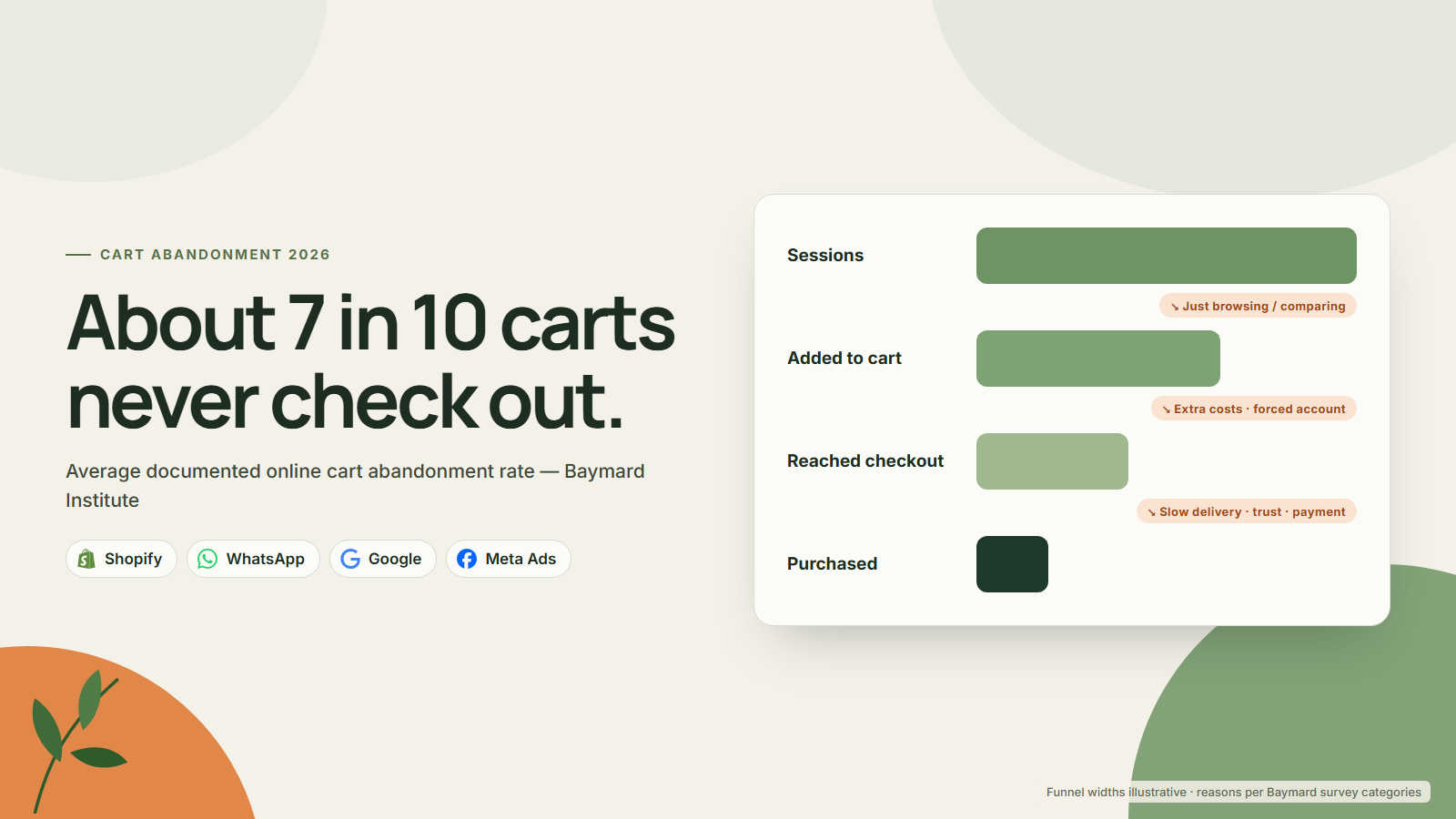
The average cart abandonment rate is 70.22%, according to Baymard Institute’s benchmark of 50 studies. That figure has barely moved in years, and it still describes most online stores in 2026: roughly seven in ten carts never become an order.
Not all of that is lost revenue. A large share of shoppers add products to a cart to compare prices, save items or check the delivery cost, with no intention of buying that day. The useful work is separating that unavoidable abandonment from the part your store is causing.
This guide explains what the 70% figure does and does not tell you, how to measure your own rate in Shopify, which fix belongs to which abandonment reason, and how to run email, SMS and WhatsApp recovery without breaking consent rules.
Key takeaways
- Baymard’s average documented cart abandonment rate is 70.22%, based on 50 studies.
- 42% of US shoppers in Baymard’s survey abandoned because they were just browsing, which no checkout fix will solve.
- Among the remaining reasons, extra costs (40%), slow delivery (20%) and trust (19%) lead the list.
- Fix the checkout first, then build consented recovery flows across email, SMS and WhatsApp.
Platforms in this guide
 Shopify
 WhatsApp
 Google
 Meta Ads
What is the cart abandonment rate in 2026?
Baymard Institute’s cart abandonment rate list puts the average documented rate at 70.22%, calculated from 50 studies published between 2006 and 2025. As of 24 September 2026, the page shows a last update of 22 September 2025, so the benchmark is the most recent widely cited figure, not a fresh 2026 measurement.
Treat the number as a cross-industry reference point. It averages studies with different methods, sample periods and store types, so it cannot tell you whether your own rate is good.
A fashion store with heavy browsing traffic and a replenishment brand selling to repeat customers will sit in very different places.
Baymard is also direct about what the average includes. Its page says a large portion of abandonment comes from window shopping, price comparison, saving items for later and exploring gift options, and calls these “largely unavoidable”. Baymard does not publish a separate adjusted abandonment rate. Instead, it removes the just-browsing group before analysing the reasons a checkout can influence.
Even so, Baymard’s own estimate of the upside is large. Focusing only on checkout usability issues it has documented as solvable, it says the average large ecommerce site can gain a 35.26% increase in conversion rate through better checkout design.
Why do shoppers abandon their carts?
In Baymard’s latest quantitative survey, 42% of US online shoppers said they had abandoned a cart because “I was just browsing / not ready to buy”. When Baymard excludes that group, extra costs are the leading reason at 40%, followed by slow delivery at 20% and lack of trust with card details at 19%.
Here is the full distribution of checkout abandonment reasons from Baymard’s page, excluding just-browsing:
| Reason given by US shoppers | Share |
|---|---|
| Extra costs too high (shipping, tax, fees) | 40% |
| Delivery was too slow | 20% |
| Didn’t trust the site with credit card information | 19% |
| The site wanted me to create an account | 18% |
| Too long / complicated checkout process | 17% |
| Website had errors / crashed | 17% |
| Returns policy wasn’t satisfactory | 13% |
| Couldn’t see / calculate total order cost up front | 12% |
| The credit card was declined | 10% |
| There weren’t enough payment methods | 9% |
| I don’t know | 7% |
The shares add up to well over 100%, so many shoppers named more than one reason. Read the table as a list of friction sources, not a pie chart.
Notice how many of these are about money and certainty rather than design polish. Extra costs and an unclear total together describe a shopper who found out the real price too late. Slow delivery and a weak returns policy describe a shopper who could not judge the risk of buying. On checkout length, Baymard’s benchmark says the average US checkout shows 23.48 form elements by default, while an ideal flow can be as short as 12 to 14.
Measuring your own rate in Shopify
Shopify’s Conversion rate breakdown report shows the path from sessions to cart, checkout and purchase. The three fields you need are sessions with cart additions, sessions that reached checkout and sessions that completed checkout. Divide one step by another to get each drop-off rate.
Shopify’s analytics fields reference defines them as follows. Sessions with cart additions are visits in which a visitor added an item to the cart. Sessions that completed checkout are visits in which a purchase was completed. The behaviour reports page adds that a session only counts as reached checkout when there was user input, such as a key press or click, during checkout.
Two useful rates come from those fields:
- Cart abandonment rate = 1 − (sessions that completed checkout ÷ sessions with cart additions)
- Checkout abandonment rate = 1 − (sessions that completed checkout ÷ sessions that reached checkout)
Shopify’s report also shows added-to-cart rate and reached-checkout rate, but it does not label a single “cart abandonment rate”, so calculate it yourself and keep the formula fixed.
| Funnel step (illustrative store, 30 days) | Sessions | Drop-off from previous step |
|---|---|---|
| Sessions with cart additions | 2,000 | n/a |
| Sessions that reached checkout | 1,000 | 50% |
| Sessions that completed checkout | 600 | 40% |
| Cart abandonment rate | 70% |
In this illustrative example, the store loses as many carts before checkout as it does inside it, so the first fixes belong in the cart and on the product page.
Split the same report by device and by traffic source. A mobile rate far above desktop usually points to a layout or payment problem, while a paid-social spike often signals browsing intent. If product-page shoppers scroll past the main purchase control, the Shopify sticky add to cart test plan shows how to test the shortcut without losing variant, cart, or profit accuracy. If many shoppers research on one device and buy on another, read what Shopify cross-device cart sync changes and how to measure it.
Shopify also lists individual abandoned checkouts under Orders > Abandoned checkouts. A checkout appears there when the customer has provided an email address and has not finished for more than ten minutes. If a new rule is creating the drop-off, the Shopify checkout validation guide shows how to choose block, warn or review behavior and test the recovery path. If you also use GA4, keep its funnel separate from Shopify’s session counts; our guide to tracking AI traffic in GA4 covers channel set-up. For a wider baseline, work through the Shopify conversion audit checklist before changing anything.
A fix for each abandonment reason
Each Baymard reason has a specific owner in a Shopify store. Extra costs are a pricing and shipping-rate decision, account creation is a checkout setting, and delivery speed is a fulfilment promise shown at checkout.
Matching the fix to the reason stops teams from redesigning pages when the real problem is a shipping fee.
| Abandonment reason | Fix | Where in Shopify |
|---|---|---|
| Extra costs too high (40%) | Show shipping cost or a free-shipping threshold on the product page and cart; avoid fees that appear only at payment | Settings > Shipping and delivery; theme cart |
| Delivery too slow (20%) | Show a specific delivery date, not just a transit range | Settings > Shipping and delivery > Estimated delivery dates |
| Didn’t trust the site with card details (19%) | Recognisable payment methods, clear business contact details, reviews near the buy button | Settings > Payments; product page template |
| Account creation required (18%) | Keep guest checkout; do not force sign-in | Settings > Checkout > Customer contact method |
| Long or complicated checkout (17%) | Remove optional fields such as company name; offer express wallets | Settings > Checkout > checkout form options |
| Errors or crashes (17%) | Test checkout on real phones after every app or theme change | Theme editor, installed apps |
| Returns policy unsatisfactory (13%) | Link a plain-language returns summary from product page and cart | Settings > Policies; product page |
| Total cost not visible up front (12%) | Show an estimated total including shipping in the cart | Theme cart, shipping rates |
| Card declined (10%) | Offer alternative payment methods so a decline is not a dead end | Settings > Payments |
| Not enough payment methods (9%) | Add local wallets, bank methods or COD where relevant | Settings > Payments |
Shopify’s checkout form options page confirms that “Require customers to sign in to their account before checkout” sits under Settings > Checkout. It also warns that when sign-in is required, accelerated options such as Apple Pay are not displayed in the online store cart. Company name, address line 2 and shipping phone number can each be set to “Don’t include”, “Optional” or “Required”, and Shopify notes that requiring company name may hide some accelerated checkout options.
Payments, delivery dates and trust
Payment choice, delivery certainty and trust account for four of Baymard’s reasons: trust (19%), slow delivery (20%), declined cards (10%) and too few payment methods (9%). Shopify handles much of this natively through accelerated checkouts, manual methods such as cash on delivery and automated delivery dates in eligible countries.
Express wallets on mobile
Shopify’s accelerated checkouts page lists Shop Pay, Apple Pay, Google Pay, Amazon Pay and PayPal. These wallets save payment and shipping details so returning customers can pay faster, and buttons can appear on product pages and in an Express Checkout section at the start of checkout. On a phone, that removes most of the typing Baymard counts as checkout length.
COD and local methods for international markets
What counts as a trusted payment method varies by country. Shopify’s manual payment methods include cash on delivery, bank transfers and money orders, set up under Settings > Payments. Manual-payment orders stay “Pending” until you mark them paid. COD can lift checkout completion in markets where card use is low, but it moves risk to delivery: refused parcels cost freight both ways. If you offer COD, confirm orders before dispatch; our guide to AI calling for COD confirmation explains one way to do that.
Delivery date clarity
Shopify’s automated delivery dates show a specific date such as “Estimated delivery Mon, Jun 30” at checkout, based on your fulfilment history and transit estimates. As of 24 September 2026, the feature covers the United States and selected European countries, requires a Basic plan or higher and only applies when the prediction falls within 5 days in the US or 4 days in Europe. Outside those markets, set manual delivery dates or state a realistic dispatch-and-delivery window on the product page.
Trust signals
Trust is not a badge. Show a real business name and contact route, recent reviews next to the purchase button and a returns summary a shopper can read in ten seconds. Make sure the checkout domain, logo and colours match the storefront, because a sudden change of look at payment is exactly when a cautious shopper hesitates.
Pressure tactics regulators already flag
Avoid pressure tactics that are not true. The US Federal Trade Commission’s 2022 dark patterns report flagged countdown timers on offers that are not actually time-limited, and India’s consumer regulator lists false urgency, drip pricing and basket sneaking among 13 specified dark patterns.
The FTC’s report announcement also criticises advertising part of a price and revealing mandatory charges late, which is Baymard’s top abandonment reason described from the regulator’s side. India’s Central Consumer Protection Authority issued its Guidelines for Prevention and Regulation of Dark Patterns, 2023 on 30 November 2023.
In practice, avoid:
- Countdown timers that reset on reload or apply to an offer that never ends.
- “Only 2 left” messages not linked to real inventory.
- Pre-ticked add-ons such as insurance or gift wrap added to the cart without consent.
- Fees that appear for the first time at the payment step.
- Discount codes in every recovery message, which teach customers to abandon on purpose.
Real urgency, such as a genuine sale end date or a true dispatch cut-off, is fine. Show it plainly and let it expire when you said it would.
How should you recover abandoned carts?
Recovery works best as a short, consented sequence across the channels a customer has actually opted in to. Shopify Messaging offers three templates: recover abandoned checkout, recover abandoned cart and convert abandoned product browse. Each supports email or SMS, and by default they reach customers subscribed to email marketing.
Shopify’s marketing automations guide separates the three triggers. Abandoned checkout targets customers who started checkout but did not complete an order. Abandoned cart targets customers who added products but did not start checkout. Browse targets customers who viewed a product but left without adding it. Shopify lets you change the abandoned checkout audience to “All customers”, but do that only where local law allows messaging a non-subscriber about an unfinished purchase.
Email and SMS consent
Shopify’s SMS marketing requirements state that email consent does not carry over to SMS, and name laws such as GDPR, CPRA and TCPA. As of 24 September 2026, Shopify Messaging SMS is available in a limited list of countries, including the United States, Canada and the United Kingdom, and SMS marketing to Spanish numbers has been paused since 15 September 2026. Elsewhere you will need a third-party SMS app and local advice.
WhatsApp rules
In markets where WhatsApp is the everyday messaging app, a reminder there may be read long before an email, but the channel has the strictest rules. Meta’s opt-in policy requires you to state clearly that the person is opting in to messages, name your business and comply with applicable law; a website checkbox is an accepted method. Outside the 24-hour customer service window, you can only send approved templates. Meta’s template category guidelines use a cart reminder as an example of a marketing template, so do not submit one as utility.
A sequence to test
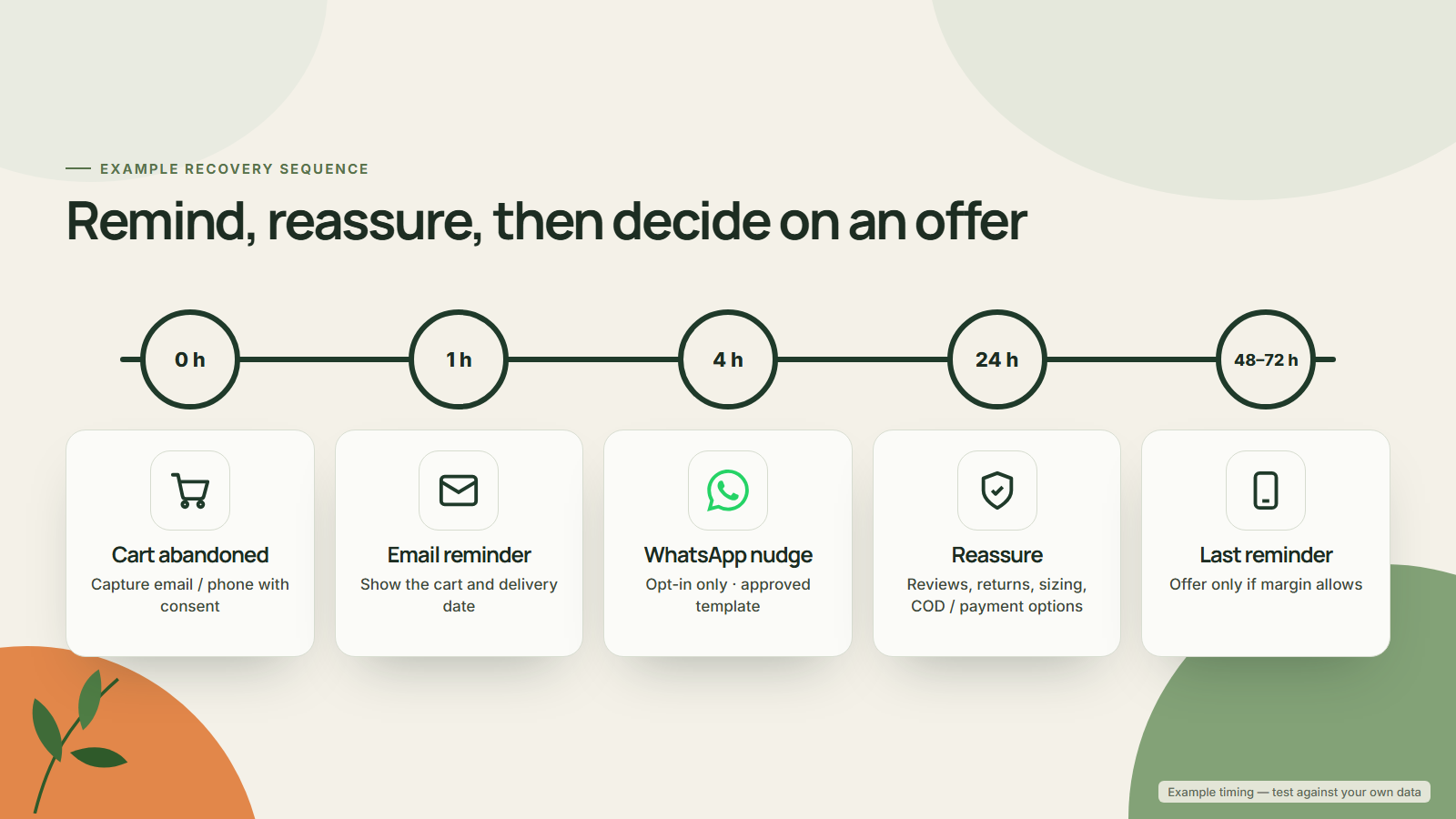
This timing is illustrative, a starting point to test against a hold-out group rather than a benchmark:
- 1 hour: email with the cart contents, image and a direct link back to checkout. No discount.
- About 20 to 24 hours: WhatsApp or SMS to opted-in customers only, answering the likely objection: delivery date, returns or payment options.
- 48 to 72 hours: final email with reviews or a size or usage guide. Add an incentive only if a test proves it creates extra orders.
Stop the sequence as soon as the customer orders. Meta retargeting of cart abandoners can run alongside, but it depends on the same consent signals as your pixel, so keep it within your cookie-consent set-up.
Free-shipping thresholds, bundles and what to fix first
A free-shipping threshold addresses Baymard’s largest reason, extra costs at 40%, and can raise average order value at the same time. Shopify lets you set a minimum order value on a price-based shipping rate or on a free-shipping discount.
A free-shipping threshold calculated from margin and delivery cost addresses Baymard’s largest reason, extra costs at 40%, and can raise average order value at the same time. Shopify lets you set a minimum order value on a price-based shipping rate or on a free-shipping discount. The threshold only helps if the margin on the extra units covers the shipping you absorb.
Set the threshold slightly above your current average order value, then give shoppers an easy way to reach it: a small add-on, a refill pack or a two-item bundle shown in the cart. The bundle planner helps you test bundle prices against cost, and the bundle pricing guide explains how to avoid discounting away the margin. Check the result in the unit economics calculator before you publish the threshold.
For peak season, plan thresholds and shipping cut-off dates together. Our BFCM 2026 profit checklist covers the offer and delivery decisions to lock in before traffic peaks.
Order of operations: fix the price shock first, recover second. A recovery flow that brings a shopper back to the same surprise shipping fee usually repeats the abandonment, and adds a message cost to it.
Step back from the individual fixes and the pattern is simple. Seven in ten carts are still abandoned, and a large share of that is ordinary browsing no store can prevent. The part you can influence is mostly surprise costs, delivery certainty, trust and friction, and most of those fixes are settings and page content rather than a redesign. Measure your own funnel in Shopify, fix the reason behind your biggest drop-off, then add consented recovery messages, and judge every change by completed orders and contribution rather than by how many reminders were sent.
Find where your carts are leaking
MlabsGrowth reviews the product page, cart, checkout settings and recovery flows for Shopify brands, then prioritises the fixes most likely to reduce abandonment without cutting margin.
Fix cart and checkout drop-off on Shopify or book a 30-minute call.
Frequently asked questions
What is the average cart abandonment rate in 2026?
Baymard Institute’s benchmark is 70.22%, an average of 50 studies published between 2006 and 2025. As of 24 September 2026, the page was last updated on 22 September 2025. It is a cross-industry average, so use it as context and compare your own store against its own history instead.
Why do shoppers abandon their carts?
In Baymard’s latest survey, 42% of US online shoppers had abandoned a cart because they were just browsing. Excluding that group, the top reasons were extra costs too high (40%), slow delivery (20%), not trusting the site with card details (19%) and being asked to create an account (18%).
How do I find my cart abandonment rate in Shopify?
Open the Conversion rate breakdown report under Analytics. Divide sessions that completed checkout by sessions with cart additions, then subtract the result from 1. Repeat with sessions that reached checkout to isolate checkout abandonment. Compare the same date range for mobile and desktop.
Can I send abandoned cart reminders on WhatsApp?
Yes, if the customer has opted in to messages from your business. Meta’s opt-in policy requires you to name the business and state that the person is agreeing to receive messages. Reminders sent outside the 24-hour customer service window must use an approved template, and Meta lists cart reminders as marketing.
Should abandoned cart emails include a discount?
Not by default. Baymard’s reasons point to costs, delivery, trust and checkout friction, so fix those first. If you test a discount, hold it back until a later message, measure incremental orders against a control group and check margin with a unit economics calculator before rolling it out.
Source notes
- Cart Abandonment Rate Statistics. Baymard Institute, updated 22 September 2025. Accessed 24 September 2026.
- Behavior reports. Shopify Help Center. Accessed 24 September 2026.
- Analytics data points (fields) reference. Shopify Help Center. Accessed 24 September 2026.
- Abandoned checkouts. Shopify Help Center. Accessed 24 September 2026.
- Editing the checkout form options. Shopify Help Center. Accessed 24 September 2026.
- Accelerated checkouts. Shopify Help Center. Accessed 24 September 2026.
- Manual payment methods. Shopify Help Center. Accessed 24 September 2026.
- Setting up automated delivery dates. Shopify Help Center. Accessed 24 September 2026.
- Creating and managing marketing automations in Shopify Messaging. Shopify Help Center. Accessed 24 September 2026.
- Requirements and guidelines for sending SMS marketing campaigns. Shopify Help Center. Accessed 24 September 2026.
- WhatsApp Business Platform: Get opt-in for WhatsApp. Meta for Developers. Accessed 24 September 2026.
- WhatsApp template category guidelines. Meta for Developers. Accessed 24 September 2026.
- FTC Report Shows Rise in Sophisticated Dark Patterns Designed to Trick and Trap Consumers. US Federal Trade Commission, published 15 September 2022. Accessed 24 September 2026.
- Central Consumer Protection Authority issues Guidelines for Prevention and Regulation of Dark Patterns, 2023. Press Information Bureau, Government of India. Accessed 24 September 2026.