Shopify purchase order reports now bring supplier commitments, inbound movement, and receiving data into Shopify Analytics. The update is useful because it can replace a stitched-together weekly review with three defined report views. It does not turn ordered stock into available stock or make the next purchasing decision automatically. Treat the reports as an exception list, not a demand forecast or an accounting ledger.
Shopify announced the reports on October 6, 2026. Search results across US, UK, India, and global-English queries show the same practical intent: merchants want to understand the three reports, find stock gaps, compare supplier costs, and know what the data cannot prove. This guide turns that intent into one weekly control plan.
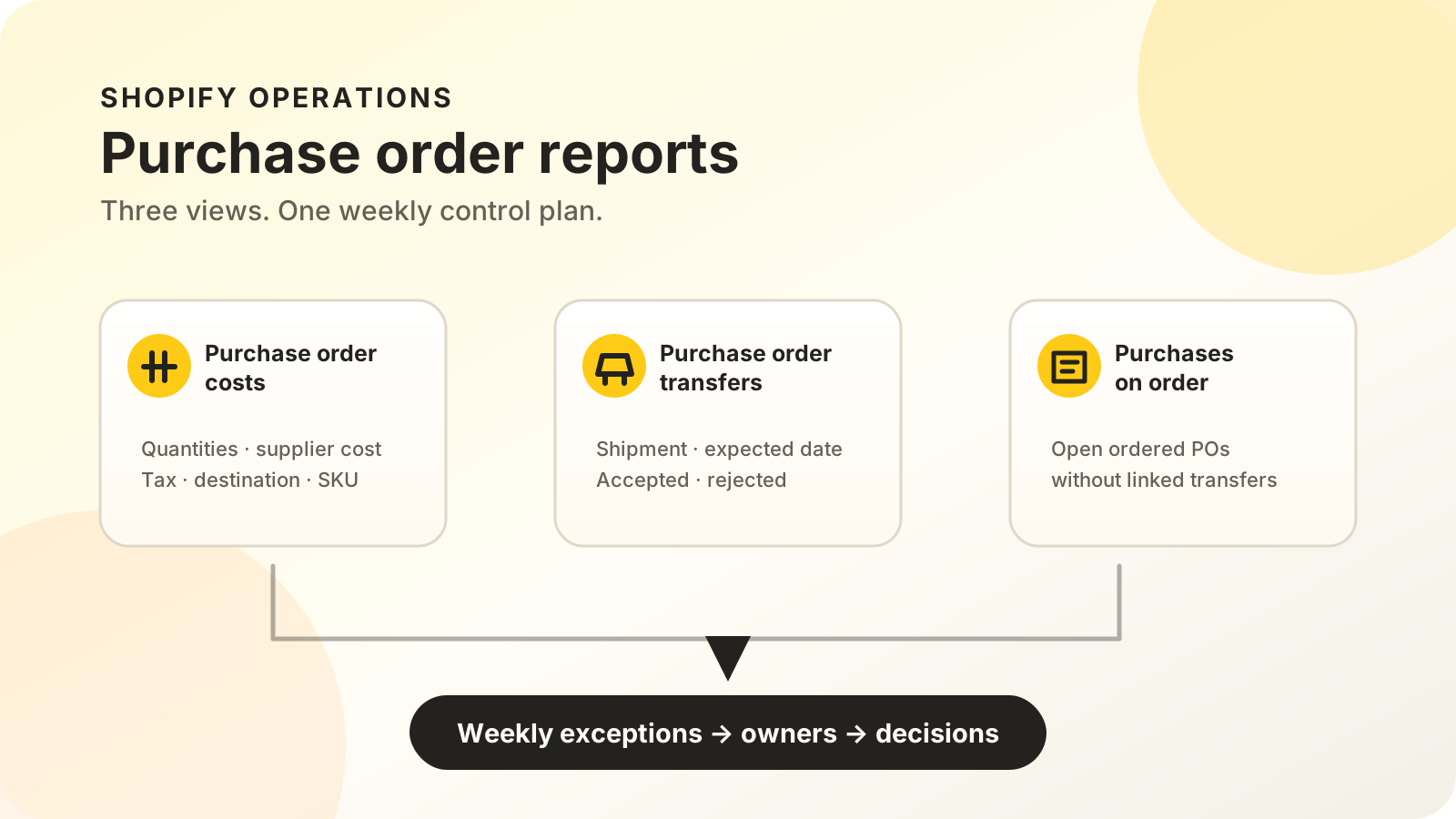
Three new report views in Shopify Analytics
In October 2026, Shopify’s Analyze purchase orders in Shopify Analytics announcement introduced three default reports and the ability to export purchase order data. The release also added summary measures on the Purchase Orders page, including total items ordered, acceptance rate, and shipments due soon.
The three reports have separate jobs:
- Purchase order costs shows ordered items, quantities, supplier costs, estimated taxes, and purchase order costs.
- Purchase order transfers follows linked transfers through shipments and receiving.
- Purchases on order shows open, ordered purchase orders that do not have linked transfers.
Shopify’s purchase order reporting documentation says the reports can also group activity by supplier, destination, SKU, variant, staff member, or the app that created the record. It uses careful availability language, so check whether purchase order analytics appears in your own store before planning a workflow around it.
What does each report tell you?
Shopify’s three default reports answer three different questions: what the business committed to buy, what is moving, and which ordered records still lack a linked movement record. The official documentation does not describe them as a demand forecast, supplier scorecard, payment ledger, or complete profit report.
| Report | Use it to answer | Do not assume |
|---|---|---|
| Purchase order costs | What quantities and supplier costs were recorded? | The total equals cash due now or complete landed cost |
| Purchase order transfers | What shipped, arrived, was accepted, or was rejected? | Every ordered unit is available to sell |
| Purchases on order | Which open ordered POs have no linked transfer? | Every unlinked PO is late or at fault |
The costs report converts supplier-currency metrics into store currency. Shopify says the conversion uses a daily exchange rate from when the line item was added, so the report amount can differ from the purchase order. Include supplier currency when investigating a mismatch.
For the buying trigger itself, use the inventory reorder point guide and the free inventory planner. The reports explain what has already been ordered; reorder logic estimates when another commitment might be needed.
From purchase order to sellable stock
Shopify separates one supplier order into two linked records. The purchase order holds products, quantities, costs, payment terms, and supplier details. A linked inventory transfer then tracks shipments, receiving, and cost adjustments. This split keeps the commercial agreement apart from the physical movement of goods.
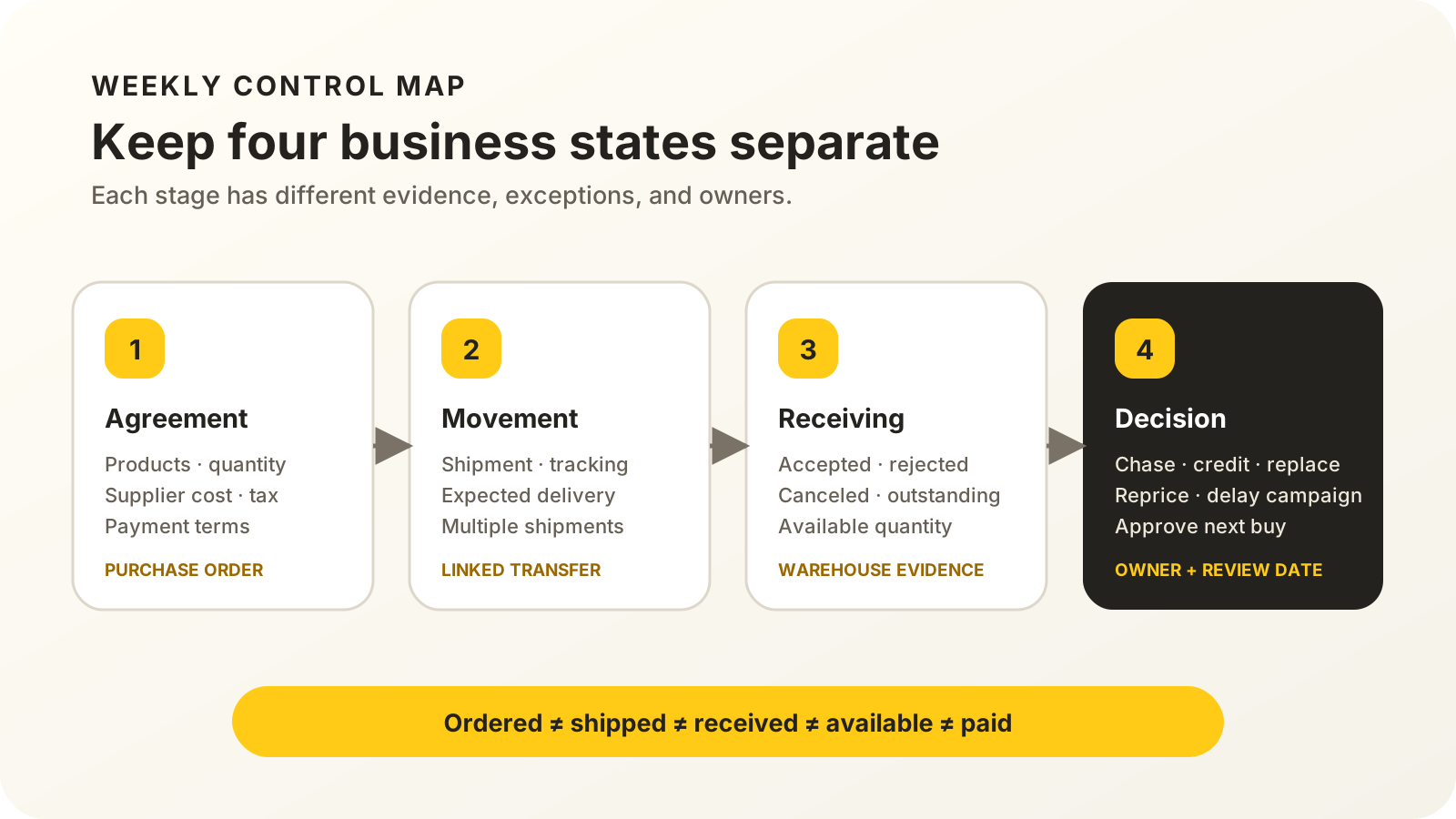
Shopify’s receiving inventory guide defines three receiving outcomes. Accepted units become available at the destination. Rejected units remain recorded but do not increase available quantity. Canceled units account for stock that will not arrive. Anything still outstanding keeps the transfer in progress.
That separation prevents a common planning error: treating 500 ordered units as 500 sellable units. The useful chain is:
Purchase order -> linked transfer -> shipment -> accepted quantity -> available stockA purchase order can support only one linked transfer at a time, while that transfer can contain multiple shipments. The purchase order and transfer also operate independently after linking, so teams should not assume that editing one automatically repairs the other.
Which records must be clean before you trust the reports?
Shopify lists eight core purchase-order metrics. They cover order counts, quantities, line items, unique items, supplier cost, tax, total cost, and weighted average unit cost. Each calculation depends on clean supplier, currency, SKU, quantity, cost, date, and destination fields.
Start with five checks:
- Supplier identity: use one stable supplier name and currency.
- Product identity: keep internal variant SKUs and supplier SKUs populated.
- Cost inputs: record supplier unit cost, tax, and quantity before reading totals.
- Dates: choose the date field that matches the question. Default reports use different date bases.
- Movement records: link the correct transfer and receive each shipment accurately.
Shopify’s troubleshooting notes explain why this matters. Zero cost can mean that unit cost, tax, or ordered quantity is missing. Blank average unit cost can mean there is no ordered quantity. Missing product information can reflect purchase-order lines without a product variant.
For full product economics, compare these supplier records with the landed cost guide. Freight, customs, receiving, payment fees, returns, and advertising do not become complete merely because a purchase order has a total.
Checks for US, UK, India, and global teams
Across four English-language markets, the search intent stays operational: merchants want setup guidance, report definitions, and clear limits. The same three Shopify reports support those questions, while tax treatment, supplier terms, currencies, duties, and accounting rules remain local business inputs.
For every market, verify:
- the store and supplier currencies used on each purchase order;
- which destination location will receive the goods;
- whether estimated tax and shipment adjustments match local records;
- who owns supplier confirmation, receiving, and finance approval;
- whether an ERP, warehouse system, or accounting tool remains the source of truth.
Do not use this article as tax or accounting advice. The safe cross-market rule is simpler: preserve the original currency and source records, reconcile differences, and let the responsible local adviser decide the treatment.
When are the native reports not enough?
Shopify’s three default reports are a good fit when the platform already holds purchase orders and receiving records your team trusts. A separate system may still be needed for demand forecasting, warehouse bin locations, lot traceability, supplier invoice matching, accounting entries, or multi-channel purchasing.
The boundary matters. Shopify’s inventory transfer reporting documentation supports shipment status, expected delivery, accepted quantity, rejected quantity, and acceptance rate. It does not prove a physical count is correct or an invoice should be paid.
When a receiving exception points to a shelf mismatch, use a variance-first Shopify stock count before changing replenishment or availability.
Before buying another app, write the missing decision in one sentence. If the gap is “show ordered POs without linked transfers,” the native report may cover it. If the gap is “forecast the next twelve weeks across marketplaces and allocate cash,” define the extra data and controls first.
A five-step weekly review routine
Run five views in the same order each week: unlinked orders, transfers, costs, demand, and assigned exceptions. The reports supply the evidence, but the team still makes the decision. Every review should end with one owner and one next action for each material exception.
- Open Purchases on order. Check high-priority ordered POs without linked transfers. Confirm whether each is awaiting supplier shipment, missing setup, or stale.
- Open Purchase order transfers. Review shipments due soon, late movement, partial receipts, rejected units, and unresolved quantities.
- Open Purchase order costs. Compare spend and ordered quantity by supplier and SKU. Investigate material unit-cost changes.
- Compare demand and availability. Add sales velocity, current available stock, campaign commitments, and reorder points before approving another buy.
- Assign exceptions. Give each late, rejected, unlinked, or cost-change item one owner and one review date.
The reports become operational only when each exception changes a decision. A rising supplier cost should trigger a margin review. A late shipment should trigger a merchandising contingency. Rejected stock should trigger a supplier credit, replacement, or write-off decision.
If purchasing commitments threaten near-term liquidity, pair the review with the cash runway guide. Ordered cost, invoice due date, and cash leaving the bank are related, but they are not the same timestamp.
Run that way, the three reports give the team a clearer weekly starting point. Keep the supplier agreement, stock movement, receiving result, and cash decision separate, then turn missing transfers, late shipments, rejected units, and changing costs into named actions.
Turn the report into an owned weekly workflow
MlabsGrowth can map the handoffs, exceptions, and human approvals around your existing Shopify and order stack before automation is scoped.
See how we automate purchase orders and stock checks or browse all MlabsGrowth services.
Frequently asked questions
What are the three Shopify purchase order reports?
They are Purchase order costs, Purchase order transfers, and Purchases on order. Together they cover recorded purchasing cost, linked inbound movement, and ordered POs without linked transfers.
Do Shopify purchase order reports show available inventory?
Not by themselves. Accepted quantities on the linked transfer become available at the destination. Ordered, shipped, rejected, and outstanding quantities describe different states.
Do purchase order costs equal landed cost?
Not necessarily. Verify shipping, customs, receiving, and other adjustments before treating a report total as landed cost or product margin.
Can Shopify purchase order reports forecast demand?
No forecast is described in Shopify’s release. Pair the reports with sales velocity, available stock, lead time, and reorder rules before buying.
Source notes
- Shopify Changelog, Analyze purchase orders in Shopify Analytics, published 2026-10-06, retrieved 2026-10-15.
- Shopify Help Center, Creating custom reports for purchase orders, retrieved 2026-10-15.
- Shopify Help Center, Purchase orders, retrieved 2026-10-15.
- Shopify Help Center, Creating and managing purchase orders, retrieved 2026-10-15.
- Shopify Help Center, Receiving inventory from a purchase order, retrieved 2026-10-15.
- Shopify Help Center, Creating custom reports for inventory transfers and shipments, retrieved 2026-10-15.
