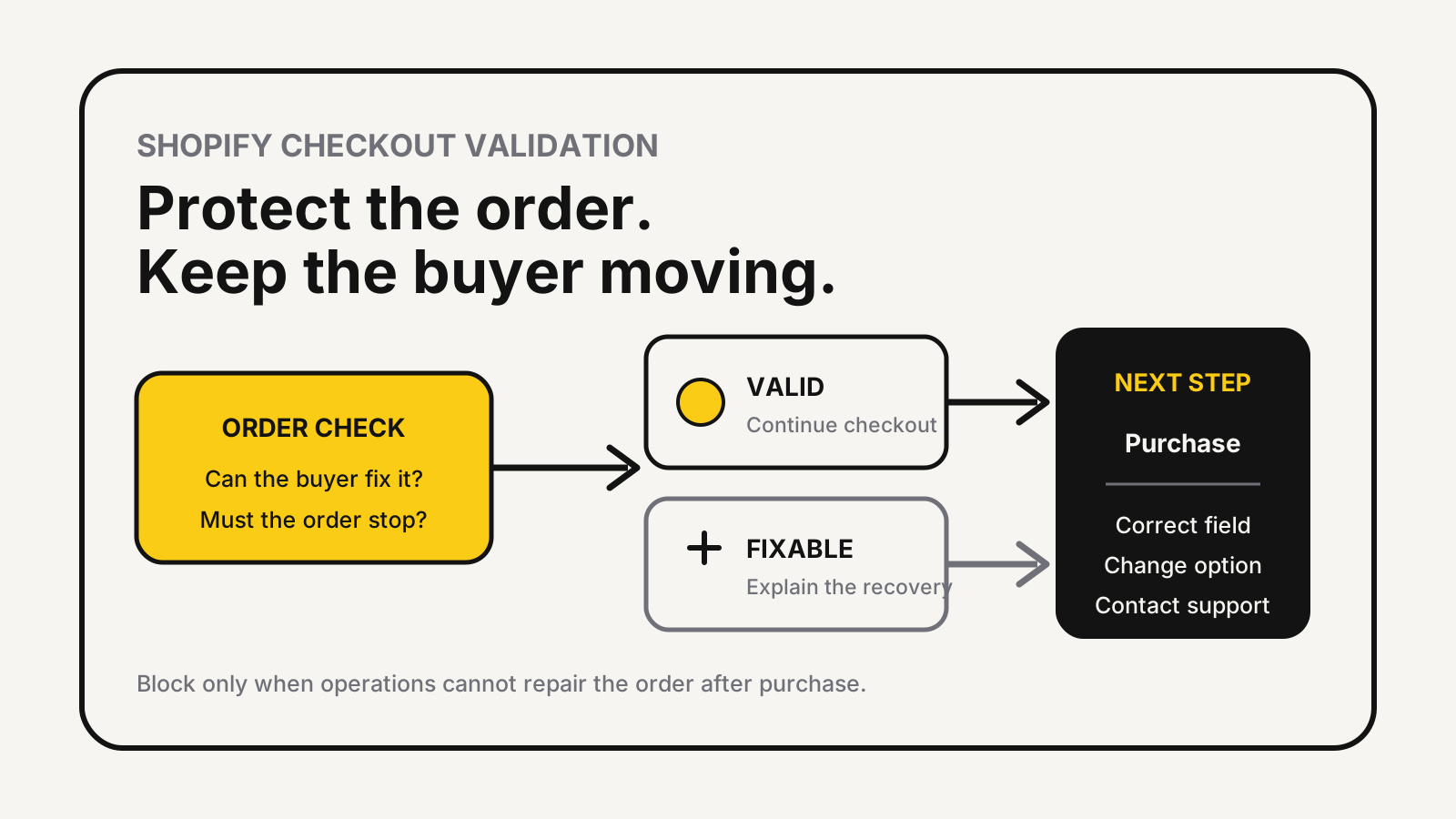
Shopify checkout validation should stop an order only when letting it through would create a clear fulfilment, legal or commercial problem. Use warnings for fixable uncertainty, hard blocks for rules that cannot be resolved after purchase, and a visible recovery message every time a buyer is stopped.
A safer rule of thumb
Block only what operations cannot repair after checkout. Explain the exact fix in the same place. If the rule depends on incomplete data, an external service or a market-specific address format, let the order continue and route it for review.
Shopify checkout validation starts with the failure
Shopify’s overview of cart and checkout validation says validation functions run on Shopify’s servers and can prevent checkout when a cart breaks a defined rule. That makes them stronger than hiding a button with theme code, but it also makes a bad rule more damaging: a valid customer cannot simply bypass it.
Write the operational failure before writing the condition. “Block PO boxes” is not enough. The failure might be that a chosen carrier cannot deliver to a PO box, while another service can. “Require a phone number” is not enough either. The failure might be that a specific COD workflow needs a reachable number in one market, not that every international card order needs one.
A defensible rule answers four questions:
- What exact loss or compliance failure does it prevent?
- Can the customer fix the problem during checkout?
- Does the condition remain true across every active market and accelerated payment path?
- What happens if the app or function cannot evaluate the rule?
If those answers are vague, start with monitoring or a warning. The cart abandonment diagnosis guide helps separate ordinary browsing from checkout friction before a team adds another blocking step.
The block, warn or review matrix
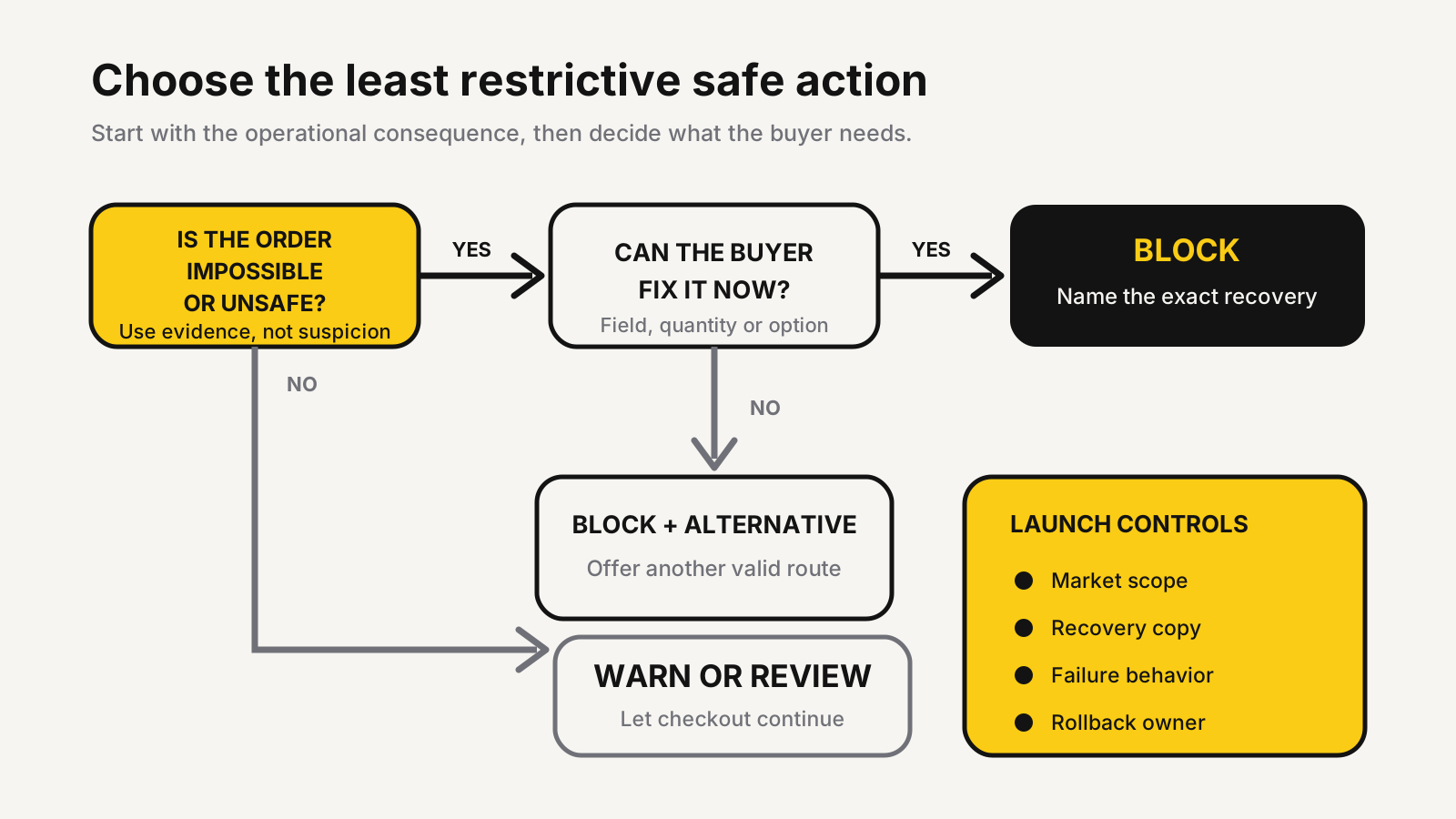
Use a hard block when the order is impossible to fulfil correctly or violates a firm selling rule. Use a warning when the buyer can make a better choice without being forced. Use post-order review when the signal is useful but not reliable enough to reject a sale.
| Situation | Default action | Reason |
|---|---|---|
| Restricted destination that no available carrier can serve | Block | The order cannot be delivered as entered. |
| Product-wide purchase cap during a limited release | Block | Front-end limits can be bypassed through alternate cart paths. |
| B2B pack size or minimum that must match warehouse handling | Block | The cart cannot be picked under the agreed rule. |
| Address looks unusual but is still deliverable | Warn | Unusual is not the same as invalid. |
| Apartment, district or landmark may be missing | Warn or review | Address conventions vary and the buyer may know the local format. |
| Order resembles fraud or bot traffic | Review | A broad blocking rule can reject legitimate buyers who share the same pattern. |
| Runtime error or unavailable dependency | Continue and alert the team | A technical failure should not silently close checkout. |
Shopify’s checkout customization instructions let merchants add, configure, activate, deactivate and remove validation rules from Settings > Checkout > Checkout rules after installing a compatible app. The same page exposes an “Allow all customers to complete checkout” choice for rule errors. Treat that as an operational decision, not a default to copy.
Fail closed only when an unevaluated rule creates a greater risk than rejecting good orders. A legal age restriction is different from an internal merchandising cap. Most conversion and data-quality rules should fail open, send an internal alert and place the resulting order into a review queue.
Address rules need market boundaries
Address validation is where reasonable-looking rules cause global damage. Postal codes, scripts, building numbers, districts, parcel lockers and phone formats differ. A pattern that works for the United States can reject a correct address in India, the UK, the UAE or Southeast Asia.
Shopify’s address collection preferences distinguish basic field validation from address suggestions. Field requirements, format and length checks apply across regions, while richer shipping-address suggestions are available only in Shopify’s listed countries. The same page warns that running Shopify’s address validation alongside a third-party address validation app can create conflicting suggestions and reduce checkout conversion.
That leads to a simple control: one address authority per checkout. Before adding a custom rule, confirm whether Shopify already checks the field, whether an app also modifies it and whether an accelerated checkout presents the same fields.
Shopify’s Checkout Blocks address-format documentation supports market-scoped rules and warns that overly strict regular expressions can block valid addresses. It also confirms that the built-in format rule targets shipping addresses, not billing addresses, and accepts Arabic, Hebrew and accented Latin characters.
Never use “ASCII only” as a global cleanliness rule. Preserve local scripts and accents. Scope PO-box, postal-code and character-length restrictions to the markets and carriers that genuinely require them.
A staged launch catches conversion traps
Test a validation like a payment change, because it sits on the purchase path. A preview that shows the right error is useful, but it is not evidence that every route behaves correctly.
Build a compact test sheet with one valid case, one invalid case and one boundary case for every rule. Then run each case through the standard cart, Buy it now, Shop Pay or another active accelerated method, mobile, desktop, each relevant market, subscriptions, bundles and draft-order checkout where applicable.
The current Cart and Checkout Validation Function API states that the validation path includes express checkouts such as Shop Pay, PayPal, Google Pay and Apple Pay. It also says a store can activate a maximum of 25 validation functions. That published limit is a reason to consolidate related logic and maintain a rule register instead of installing overlapping validators.
Use this launch sequence:
- Document the rule owner, business reason, scope, error copy and rollback switch.
- Run the test sheet on a theme preview or controlled environment.
- Activate one rule at a time during a staffed period.
- Watch checkout errors, reached-checkout sessions, completed orders and support contacts by market and device.
- Turn the rule off if legitimate buyers cannot recover from the message.
- Repeat the test after theme, app, bundle, subscription or payment changes.
The Shopify Rollouts testing plan is useful when the surrounding theme or checkout change can be staged. Validation logic still needs its own invalid and boundary cases because an aggregate conversion rate cannot explain why a buyer was blocked.
Error messages must provide an exit
A blocking message has one job: tell the buyer what failed and what action will let them continue. “Cart is invalid” describes the system, not the remedy.
Prefer: “This carrier cannot deliver to a PO box. Enter a street address or choose Standard Post.” Avoid: “Invalid address.” Prefer: “This item is limited to one per customer. Remove the extra item to continue.” Avoid: “Quantity rule failed.”
Keep the message beside the affected field or cart line when the platform supports it. Use the buyer’s language. Do not expose fraud logic, internal tags or technical details. If there is no customer action that can fix the condition, provide a real alternative such as another delivery method, product or contact route.
An illustrative review can make the cost visible. Suppose 200 checkout attempts meet a new rule, 160 buyers correct the issue, 20 leave, and 20 reach support. Those figures are illustrative, not a benchmark. The useful measures are the recovery rate, false-positive reasons and preventable contacts, compared by market and device.
Ownership after launch
Every active rule needs an owner and an expiry question. Promotions end. Carrier coverage changes. Product caps move. A checkout restriction that was correct last quarter can become silent friction after the underlying reason disappears.
Maintain a rule register with the rule name, app or function, affected markets, business owner, launch date, last test date, failure behavior and rollback path. Review it after major checkout changes and before peak campaigns. If two rules inspect the same field, decide which one owns the final decision.
Tie the result back to profit, not only error counts. A rule can reduce costly exceptions while lowering completed orders, so compare prevented loss against contribution from the orders it rejects. The D2C profit calculator helps model payment, delivery, returns and advertising costs without pretending every blocked order was bad.
Audit the rules between cart and purchase
MlabsGrowth can map your checkout rules, market exceptions, recovery messages and measurement plan so valid buyers can finish while unsafe orders are handled deliberately.
Improve Shopify checkout conversion without removing necessary controls or browse all MlabsGrowth services.
Sources
- Shopify Developer Docs, About cart and checkout validation, retrieved 2026-10-23.
- Shopify Help Center, Customizing payment methods and delivery options at checkout, retrieved 2026-10-23.
- Shopify Help Center, Set up address collection preferences, retrieved 2026-10-23.
- Shopify Help Center, Setting up address format validation in Checkout Blocks, retrieved 2026-10-23.
- Shopify Developer Docs, Cart and Checkout Validation Function API, retrieved 2026-10-23.
