POAS vs ROAS comes down to what sits on top of the fraction. Return on ad spend (ROAS) divides attributed revenue by ad spend. Profit on ad spend (POAS) divides the profit from those same orders by ad spend. ROAS tells you whether ads generate sales; POAS tells you whether those sales leave any money after product, shipping, fees and returns.
The gap matters most when a store sells products with different margins. A 4.0 ROAS can be excellent for a high-margin serum and loss-making for a low-margin gadget. Ad platforms bid on whatever value you send them, so a revenue-only signal quietly pushes budget towards products that look good in Ads Manager and poor in the bank account.
This guide covers the formulas, a worked example, the costs to include, and what Google Ads and Meta actually support for profit data as of 24 September 2026.
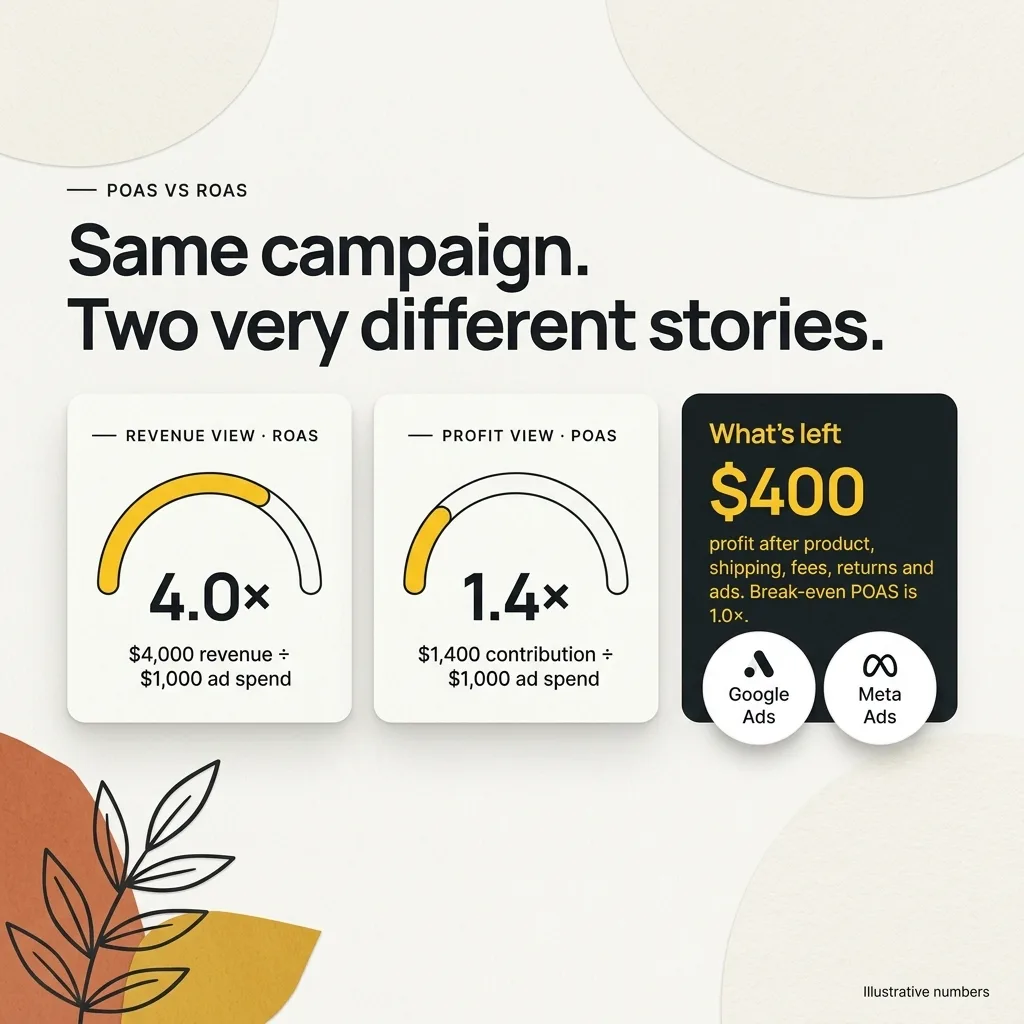
Quick answer: ROAS measures revenue per unit of ad spend; POAS measures profit per unit of ad spend. Because break-even ROAS equals 1 divided by contribution margin, every product has its own floor. Google Ads can report gross profit when cart data and COGS are connected, though its profit goals are in beta. Meta optimises on the value you send, so profit-based signals there need careful design and labelling.
Platforms in this guide
 Google Ads
 Meta Ads
 Shopify
What is the difference between POAS and ROAS?
ROAS is revenue divided by ad spend, so ₹100,000 of attributed sales from ₹25,000 of spend is a ROAS of 4.0. POAS replaces revenue with profit: gross profit or contribution divided by ad spend. The two metrics answer different questions, and only POAS reflects margin.
The formulas are simple:
- ROAS = attributed revenue ÷ ad spend
- POAS (gross profit version) = (revenue − cost of goods sold) ÷ ad spend
- POAS (contribution version) = (revenue − product cost − shipping − payment fees − returns and RTO allowance) ÷ ad spend
There is no single industry definition of POAS. Gross profit is easy to pull from a product feed; contribution is closer to cash. Pick one and keep it consistent.
On the contribution version, a POAS of 1.0 is break-even. On the gross profit version it is not, because shipping, fees and returns are still unpaid. In both, use revenue net of GST or VAT.
How do you calculate break-even ROAS?
Break-even ROAS is 1 divided by contribution margin before advertising. A product that keeps 25% of net revenue after product cost, shipping, payment fees and returns needs a ROAS of 1 ÷ 0.25 = 4.0 just to cover its own ad cost on the first order. A 60% margin product breaks even at about 1.67.
This formula links the two metrics:
- Break-even ROAS = 1 ÷ contribution margin %
- POAS = ROAS × contribution margin %
So a 4.0 ROAS on a 25% margin product equals a POAS of 1.0. The same 4.0 ROAS on a 60% margin product equals a POAS of 2.4. The unit economics calculator works out contribution per order, and the unit economics guide explains which costs belong in it. Run it per product family, because a blended store margin hides the differences POAS exposes.
Two products, one ROAS, opposite results
Two products can report an identical 4.0 ROAS while one earns ₹42,000 after ads and the other loses ₹3,250. The illustrative example below uses the same ₹25,000 spend and ₹100,000 revenue for both, then deducts product cost, shipping, payment fees and an allowance for returns and RTO.
| Illustrative numbers | Product A: face serum | Product B: smartwatch |
|---|---|---|
| Orders | 50 at ₹2,000 | 25 at ₹4,000 |
| Revenue (net of tax and discounts) | ₹100,000 | ₹100,000 |
| Ad spend | ₹25,000 | ₹25,000 |
| ROAS | 4.0 | 4.0 |
| Product cost (COGS) | ₹20,000 (₹400 each) | ₹65,000 (₹2,600 each) |
| Shipping and packaging | ₹6,000 | ₹3,750 |
| Payment fees (2%) | ₹2,000 | ₹2,000 |
| Returns and RTO allowance | ₹5,000 | ₹7,500 |
| Contribution before ads | ₹67,000 (67%) | ₹21,750 (21.75%) |
| Contribution after ads | ₹42,000 | −₹3,250 |
| POAS (contribution ÷ ad spend) | 2.68 | 0.87 |
| Break-even ROAS | 1.49 | 4.60 |
All figures are illustrative, not benchmarks. Replace them with your own order data.
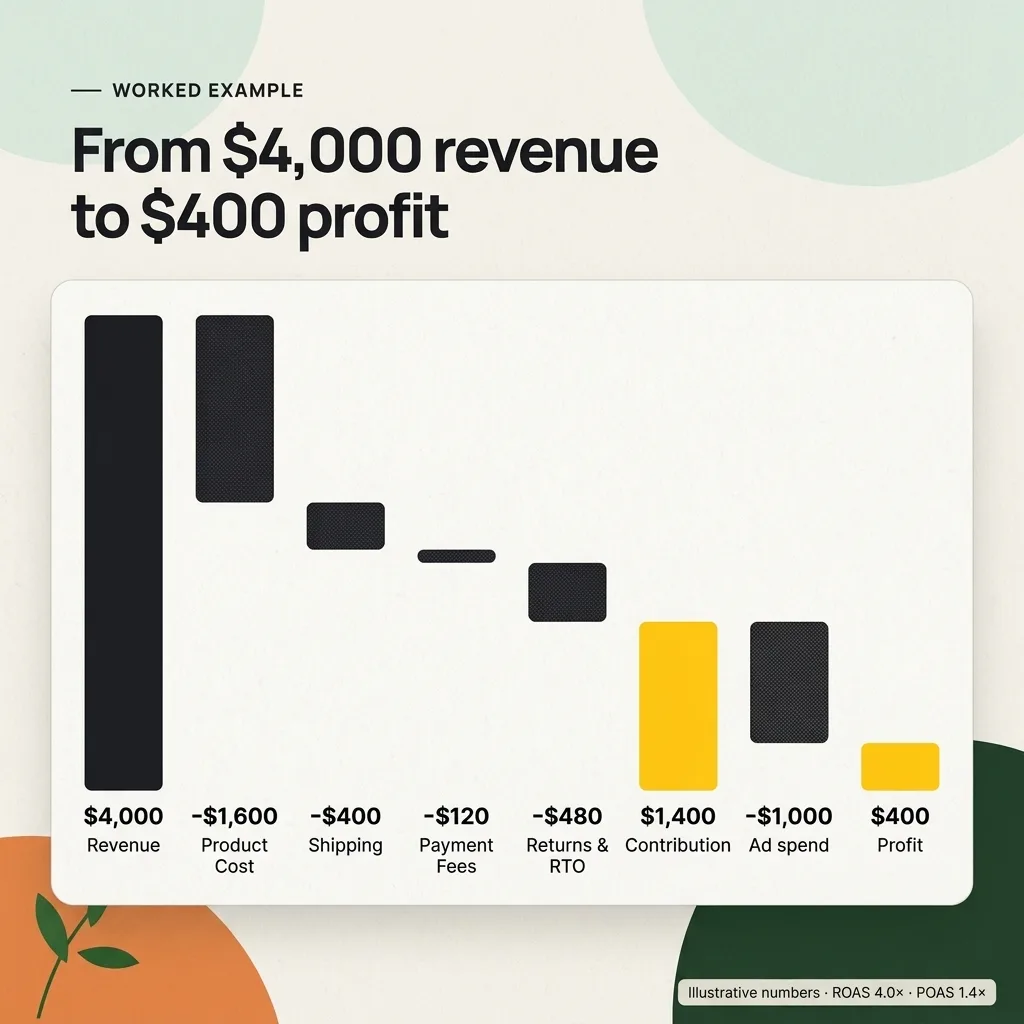
A revenue-optimised campaign sees two identical products. A profit view sees one that can take more budget and one that needs a higher target, a price change, or less spend.
Costs that belong in the profit number
Include every cost that rises with each additional order: product cost, shipping, payment fees, discounts, returns and RTO, and any marketplace or platform fees.
Leave out fixed costs such as salaries and rent. They belong in a separate break-even calculation, not in per-order bidding values.
| Cost | Include in POAS? | Where the number usually comes from |
|---|---|---|
| Product cost (COGS) | Yes | Shopify cost per item, supplier invoices |
| Outbound shipping and packaging | Yes | Courier invoices, average per order |
| Payment gateway and COD fees | Yes | Gateway settlement reports |
| Discounts and coupons | Yes, by using net revenue | Order data |
| Returns, refunds and RTO | Yes, as an allowance | Returns data, courier RTO reports |
| Marketplace or platform commission | Yes, where the channel charges it | Channel fee schedules |
| Salaries, rent, software | No, handle as fixed costs | Profit and loss statement |
Shopify’s profit reports calculate gross profit as net sales minus cost, and only for products that had a cost recorded when they sold. That is a good COGS source, not a full contribution figure.
Returns and RTO are often the largest missing cost for COD-heavy stores. The RTO cost guide and RTO simulator turn them into a per-order allowance. For multi-channel sellers, the ecommerce platform profit calculator compares fee structures.
Sending profit data to Google Ads
Google Ads reports gross profit when you use conversions with cart data and supply a cost_of_goods_sold value in Merchant Center. Google calculates profit as revenue minus COGS. Separately, Google’s retail help pages describe profit goals for Performance Max and Standard Shopping as in beta, so availability varies by account.
Step 1: Turn on conversions with cart data
With conversions with cart data, the purchase tag sends item-level details for each transaction. Only items from a Merchant Center account linked to Google Ads are processed, and item IDs must match the feed. Combined with Merchant Center COGS, this produces gross profit metrics.
Step 2: Add cost of goods sold to the feed
Merchant Center’s cost_of_goods_sold attribute takes a number plus an ISO 4217 currency code. Google says the COGS you share is for reporting purposes and does not need to be exact. Its COGS setup step adds that you can approximate, for example estimating COGS at 80% of price, and that without the attribute COGS and gross profit metrics will not be reported.
Step 3: Decide how profit reaches bidding
Google’s holiday optimisation tips say profit goals are “currently in beta testing” for Performance Max and Standard Shopping. The same page claims advertisers using gross profit optimisation see an average 15% uplift in campaign profit versus revenue-only bidding. That is Google’s figure, not an independent test.
If profit goals are not in your account, two other routes exist:
- Separate margin bands with different target ROAS values, as described above.
- Conversion value rules, which adjust values by location, device or audience and are used by Smart Bidding for Target ROAS and Maximise conversion value. Their conditions are not product-based, so they suit audience-level value differences more than SKU margins.
Google’s gross profit stops at COGS, so apply your own adjustment for shipping, fees and returns when setting targets. For refunds, Google’s conversion adjustments let you restate or retract a conversion value when an order is refunded, provided the conversion used a transaction ID.
Can Meta Ads optimise for profit?
Meta value optimisation bids on the purchase value you send through the Meta Pixel or Conversions API. Meta’s Conversions API custom data parameters list value as a monetary amount required for events using value optimisation, and net_revenue as “the margin value of a conversion event.”
That second parameter is easy to overread.
As of 24 September 2026, Meta’s developer documentation does not describe net_revenue as a bidding target or show a dedicated profit optimisation setting. Treat claims that Meta bids on profit natively with caution.
What you can control:
- The value you send. Some advertisers send margin, not revenue, as the purchase value. Meta then optimises towards higher-margin purchases, but every ROAS figure in Ads Manager becomes a margin-based figure. Label it clearly and do not compare it with older revenue-based periods.
- Value rules. Meta’s documentation lists criteria such as age, gender, location, operating system, device platform, placement and audience labels, with increases of 1% to 1,000% and decreases of 1% to 90%. Like Google’s value rules, they adjust by audience, not by product margin.
- Catalogue structure. Low-margin products in their own product sets and campaigns can carry a stricter ROAS target.
The Meta Andromeda creative guide covers how to keep control of which products get promoted as creative volume grows. Shopify’s AI-run campaigns need the same care: our Campaign Autopilot review sets out a test plan with POAS guardrails.
Server-side tracking and privacy
Profit values usually need a server-side feed, because product cost should never appear in browser code where competitors can read it. Meta’s Conversions API overview says server events can be used for measurement, reporting and optimisation, and asks advertisers to confirm events are deduplicated and matched correctly.
- Keep margins off the page. Calculate profit on the server, not in the storefront data layer.
- Deduplicate. If the Pixel sends revenue and the server sends margin for the same order, one value must win. Use a shared event or order ID.
- Respect consent. Google’s consent mode passes users’ consent choices to Google tags. Server-side events still need a lawful basis where the law requires one.
- Share only what is needed. Send a rounded margin or margin band if exact figures are not required.
This is operational guidance, not legal advice.
Three pitfalls that distort POAS
POAS is only as good as its inputs, and three errors appear most often: judging on the first order when customers repeat, mixing new and returning buyers, and reading POAS before returns settle. Each can make a good campaign look weak or a weak one look strong.
First order versus lifetime value. A campaign that loses money on the first order can still be sound if customers reorder. Base the acceptable first-order loss on observed repeat rates by cohort. Meta’s predicted_ltv parameter can carry expected lifetime value, but only as well as your prediction.
New versus returning customers. Returning customers often convert cheaply through brand searches or retargeting, which flatters blended POAS. Google’s customer lifecycle goals can bid higher for new customers or only for new customers, using customer lists and website tags to identify existing buyers. Report POAS separately for each group.
Returns lag. Refunds and RTO arrive days or weeks after the order, so same-week POAS overstates profit. Use a returns allowance in real time, then reconcile with settled orders. Review COGS and fee inputs monthly too, because supplier and courier rates change.
Frequently asked questions
What is the difference between POAS and ROAS?
ROAS divides attributed revenue by ad spend. POAS divides the profit from those sales by ad spend, using either gross profit (revenue minus product cost) or contribution (after product, shipping, fees, discounts and returns). Two campaigns can share a ROAS of 4.0 while one makes money and the other loses it.
What is a good POAS?
When POAS is calculated on contribution before ad spend, 1.0 is break-even: every unit of currency spent on ads returned one unit of contribution. Above 1.0 the campaign adds contribution after ads. The right target depends on fixed costs, repeat purchase rates and cash position, so set it from your own unit economics.
How do you calculate break-even ROAS?
Divide 1 by the contribution margin before advertising, expressed as a decimal. A product that keeps 25% of net revenue after product cost, shipping, payment fees and returns has a break-even ROAS of 1 / 0.25 = 4.0. Any ROAS below that loses money on the first order.
Can Google Ads optimise for profit instead of revenue?
Partly. With conversions with cart data and a cost_of_goods_sold value in Merchant Center, Google Ads can report gross profit. Google’s help centre also describes profit goals for Performance Max and Standard Shopping as in beta. Google’s profit is revenue minus COGS only, so shipping, fees and returns still need separate handling.
Does Meta support profit-based bidding?
Meta value optimisation uses the purchase value you send through the Meta Pixel or Conversions API. Meta documents a net_revenue parameter as the margin value of an event, but as of 24 September 2026 its developer documentation does not describe a dedicated profit bidding setting. Some advertisers send margin as the value, which changes reported ROAS.
Which metric to steer by
ROAS tells you whether advertising produces sales; POAS tells you whether those sales produce money. The decision between them mostly comes down to how uneven your margins are.
Stay on ROAS when margins are flat. If margins are similar across the products a campaign promotes, POAS moves in step with ROAS. A store selling one hero product, or a catalogue where every item keeps roughly the same contribution margin, gains little from rebuilding its tracking around profit.
Stay on ROAS when it already encodes profit. If a product family breaks even at 2.5, a target ROAS of 3.2 is a profit rule in the platform’s language. The marketing budget calculator and marketing budget guide show how to plan spend around such targets.
Move to POAS when margins diverge. That means margins that differ widely across the catalogue, heavy discounting that changes margin by season, or returns and RTO that vary sharply by product. Peak trading is a common trigger; the BFCM 2026 profit checklist covers the discount side.
If you move to POAS, start with break-even ROAS per product family, group products into margin bands, and connect COGS to Google Ads for gross profit reporting. Add shipping, fees and returns in your own reporting, and change the values sent to ad platforms only when the numbers are reliable and clearly labelled.
Turn order data into a profit signal
MlabsGrowth builds AI marketing workflows that join Shopify orders, product costs, fees and returns into a daily profit view, then prepare margin-aware values for ad platforms.
Explore the AI marketing workflow service or book a 30-minute call.
Source notes
- Google Ads Help: About conversions with cart data (accessed 24 September 2026).
- Google Ads Help: Step 2: Provide cost of goods sold (COGS) feed attribute to report on profit margins (accessed 24 September 2026).
- Google Merchant Center Help: Cost of goods sold [cost_of_goods_sold] (accessed 24 September 2026).
- Google Ads Help: Top tips to optimize for the holiday season and beyond with Google AI (accessed 24 September 2026).
- Google Ads Help: About conversion value rules (accessed 24 September 2026).
- Google Ads Help: About conversion adjustments (accessed 24 September 2026).
- Google Ads Help: About customer lifecycle goals (accessed 24 September 2026).
- Google Ads Help: About consent mode (accessed 24 September 2026).
- Meta for Developers: Conversions API: custom data parameters (accessed 24 September 2026).
- Meta for Developers: Value rules (accessed 24 September 2026).
- Meta for Developers: Conversions API (accessed 24 September 2026).
- Shopify Help Center: Profit reports (accessed 24 September 2026).
