Shopify’s own Help Center says the Analytics overview dashboard is up to date within about a minute, so sales, sessions and fulfilment are close to live.
Profit is not. Refunds, product costs and ad-platform conversions arrive later, and a fast dashboard can make an unfinished number look final.
Some June 2026 roundups say Shopify removed a “24-hour lag”. We could not verify that phrase on any Shopify page, so this guide sticks to what Shopify documents: which profit-first metrics to read daily, which to wait on, and what live data cannot tell you.
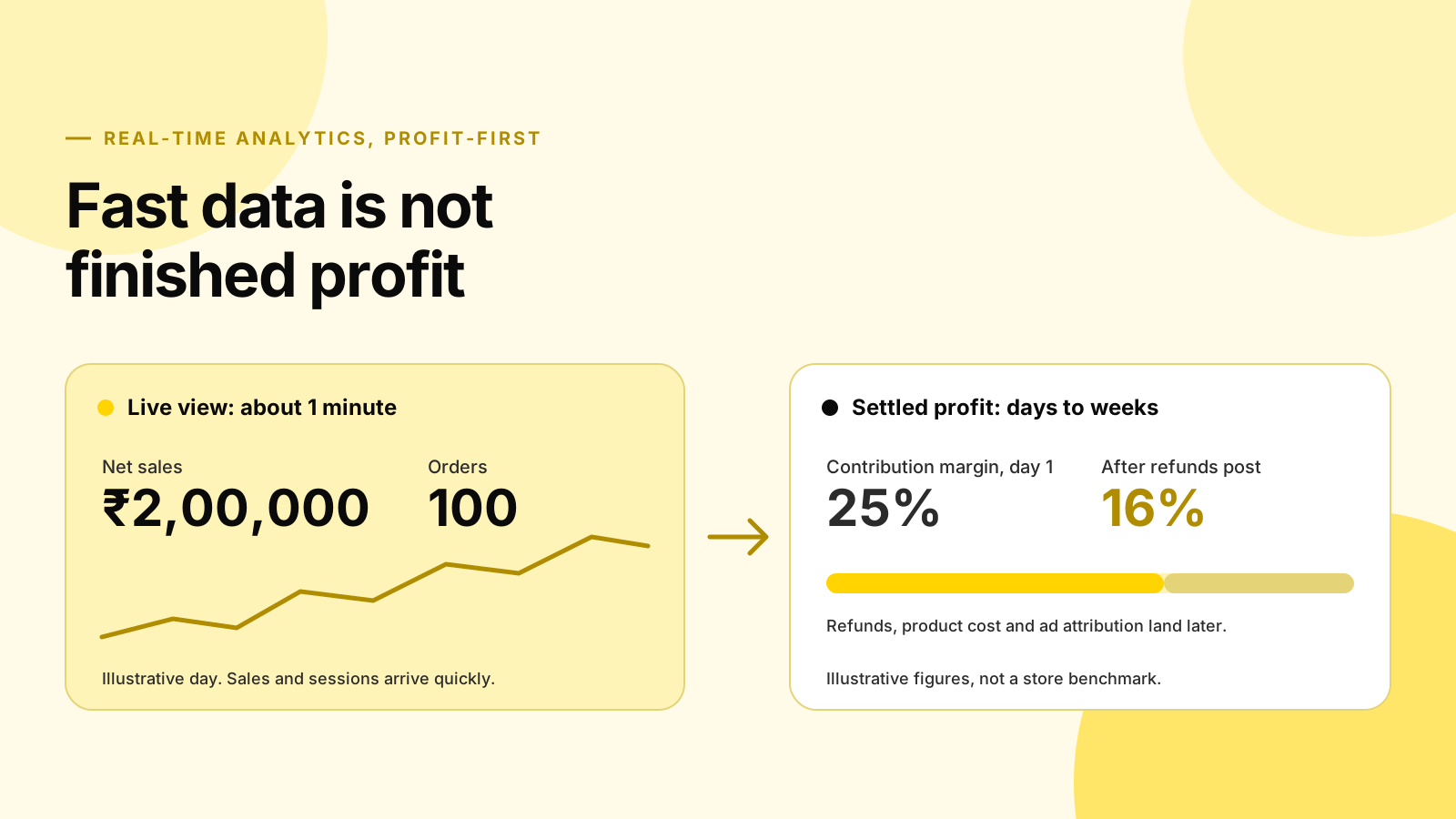
The short answer: Shopify documents about 1 minute of delay on the Analytics overview dashboard, and the “24-hour lag removed” claim is not on Shopify’s pages. Refunds are dated when they are processed, so a day’s margin looks better on day one than it will later. Track five metrics daily (provisional contribution margin, POAS, refund rate, AOV and CAC), use live data to catch breakages, and use multi-day windows to move budget.
Platforms in this guide
 Shopify
 Google Analytics 4
 Google Ads
 Meta Ads
What did Shopify actually change about analytics speed?
Shopify documents that the Analytics overview dashboard shows key sales, sessions and fulfilment metrics within about 1 minute, and you can turn on auto-refresh every 60 seconds. We found no Shopify statement that a 24-hour lag was removed.
What Shopify’s June 2026 Editions release did add is context and control. Shopify lists the release on its Editions page as “Spring ’26” with “150+ updates”, although many write-ups call it Summer ’26. The analytics items include daily insights, annotations on charts, metric targets, multi-metric charts, filters by metafields, and marketing data with spend, ROAS, impressions and sessions next to sales.
Shopify’s own analytics update post, published 17 June 2026, also describes a Shopify Flow action that runs ShopifyQL queries on a schedule. For another AI feature from the same release, see the Shopify Sidekick guide.
Two other dates matter. Shopify shows a warning on reports when data has been abnormally delayed for over 30 minutes, and its Help Center says a session measurement rollout ran from 21 to 23 September 2026. Treat session-based metrics, including conversion rate, as a measurement change when you compare across those dates.
What live data can and cannot tell you
Real-time Shopify data tells you what happened at the storefront: orders, sales, sessions and fulfilment. It cannot tell you what those orders will cost after refunds, what they cost to make, or which ad created them, because those inputs live in other systems and arrive on their own schedules.
Shopify’s Live View shows orders and visitors as they happen, and notes that high processing volumes can delay the display, which it says typically resolves within one to two hours. Use it like a smoke alarm: it tells you something just broke or spiked, not whether the day made money.
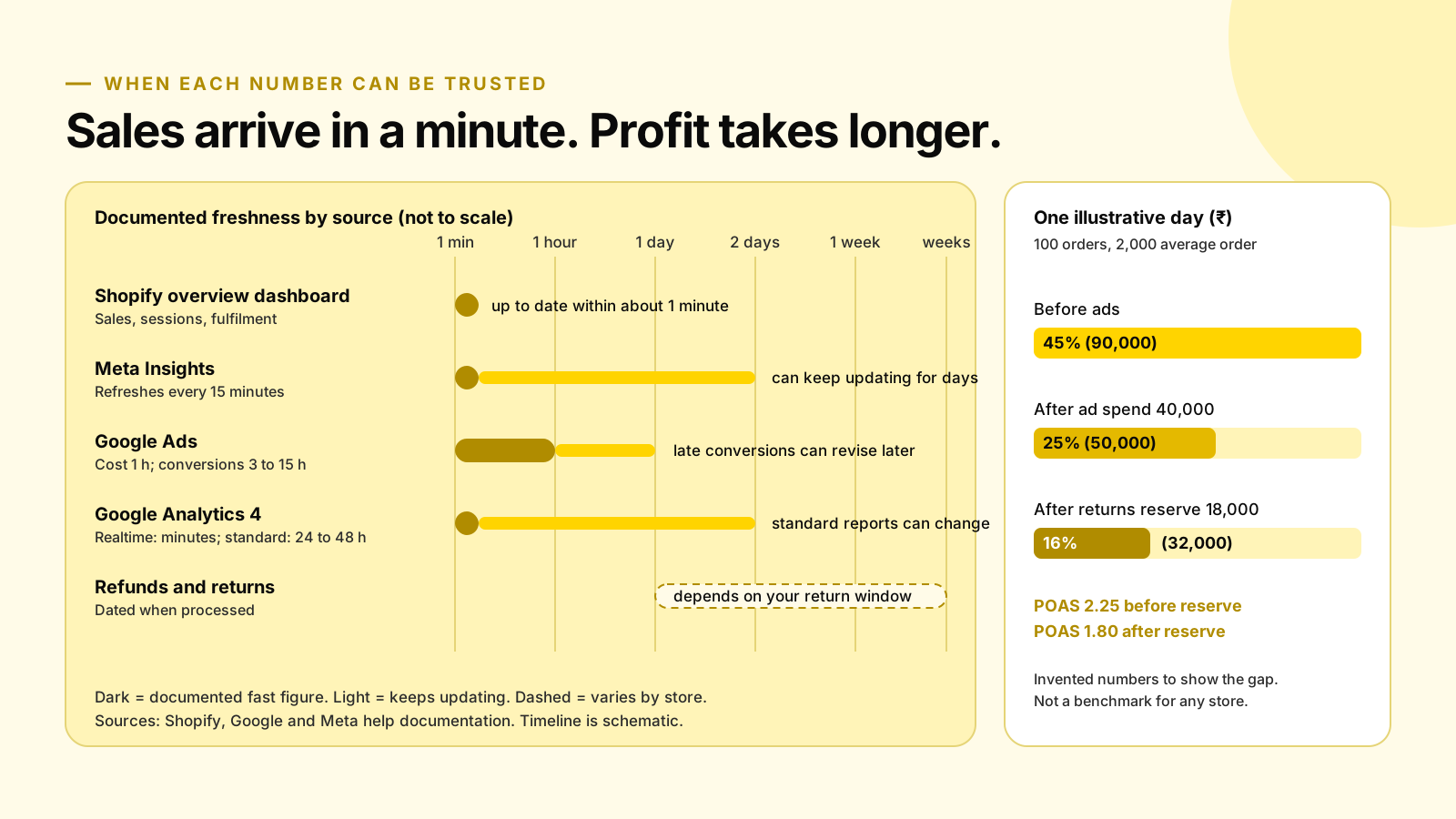
The table below lists what each source documents. The pattern is consistent: traffic and cost data are fast, conversion and profit data keep moving.
| Source | What it documents | What to remember |
|---|---|---|
| Shopify overview dashboard | Up to date within about 1 minute | Fast for sales and sessions, but not a cost or refund ledger |
| Google Analytics 4 | Standard reports can take 24 to 48 hours; Realtime is typically a few minutes | Realtime covers fewer features, so daily revenue may not match Shopify |
| Google Ads | Clicks, impressions and cost: 1-hour objective; conversions: 3 hours last-click, 15 hours for other models | Metrics may be updated one or more days after an event |
| Meta Insights | Refreshes every 15 minutes; may keep updating for a couple of days after an ad ends | Figures stop changing 28 days after being reported |
| Shopify refunds | Reversals display for the day they were processed | A refund today reduces today’s net sales, not the order’s original day |
This is why GA4 and ad platforms rarely match Shopify to the cent. They measure different events on different clocks.
Which five profit-first metrics belong on a daily dashboard?
Five metrics give a daily read on profit without pretending it is final: provisional contribution margin, POAS, refund rate, AOV and CAC. Each comes from a different system, so each needs a label for how complete it is. Write “provisional” on the margin and POAS cells.
| Metric | Formula | Source | How to read it daily |
|---|---|---|---|
| Provisional contribution margin | (Net sales - product cost - fulfilment and fees - ad spend - returns reserve) / net sales | Shopify, your cost sheet, ad platforms | Watch the trend, not one day |
| POAS | Contribution before ad spend (after reserve) / ad spend | Same inputs | Below 1.0 means the spend lost money |
| Refund rate | Sales reversals / gross sales, plus a cohort view | Shopify sales reversals | Processed-date rate moves with timing |
| AOV | (Gross sales - discounts) / orders | Shopify | Shopify excludes post-order adjustments |
| CAC | Ad spend / new customers | Ad platforms, Shopify customers | Blended daily, by channel weekly |
Shopify’s analytics fields reference defines AOV as excluding post-order adjustments and says gross profit needs cost per item set up in Shopify. Shopify renamed its Returns metrics to sales reversals on 13 March 2026, covering refunds, returns, order edits and cancellations.
For the formulas behind each line, see our unit economics guide and the POAS versus ROAS guide.
One illustrative day, before and after returns post
An illustrative day shows the gap.
With 100 orders at ₹2,000 average, contribution is 45% before ads and 25% after ₹40,000 of spend. Once a 15% returns reserve is applied, margin falls to 16% and POAS from 2.25 to 1.80. Same day, same orders, different conclusion.
Illustrative day (₹, invented figures):
| Line | Amount | Share of net sales |
|---|---|---|
| Net sales (100 orders x 2,000) | 200,000 | 100% |
| Product cost (40%) | -80,000 | |
| Fulfilment and payment fees (300 per order) | -30,000 | |
| Contribution before ads | 90,000 | 45% |
| Ad spend | -40,000 | |
| Contribution after ads, before returns | 50,000 | 25% |
| Returns reserve (15% refunded, 12,000 product cost recovered) | -18,000 | |
| Provisional contribution after reserve | 32,000 | 16% |
POAS here is 90,000 / 40,000 = 2.25 before the reserve and 72,000 / 40,000 = 1.80 after it. Shopify’s AOV would still read 2,000 after the refunds post, because it excludes post-order adjustments. The refunds would show instead as sales reversals on the days they are processed.
The 15% reserve is an assumption for the example. The National Retail Federation expected 19.3% of online sales to be returned in 2025 and 17% of holiday sales, but your own category matters more. Use your own return rate by category from the last two peaks.
What should you review weekly once the numbers settle?
Weekly, review the numbers that need time: settled contribution margin, refund rate by order cohort, POAS by product and channel, and CAC payback. Run the review a week or two after the period ends, depending on your return window, so most refunds have already posted.
Because Shopify dates reversals by processing day, a simple processed-date refund rate mixes this week’s refunds with last week’s orders. Its help content on sales discrepancies warns that if your date range includes only one side of a return, you see only part of the order.
Build the weekly view around cohorts: take orders placed in one week, then count the refunds against them as they arrive. That gives you a real return rate per cohort.
A weekly checklist:
- Settled margin. Replace each day’s provisional figure with the actual after refunds.
- Cohort refund rate. Compare it to your reserve and adjust the reserve if it was off.
- POAS by product. Move budget toward lines that earn after returns. Our marketing budget guide explains how to set ceilings.
- CAC against payback. The unit economics guide shows how to judge acquisition cost against repeat orders.
- Channel reconciliation. Compare platform-reported sales with Shopify sales and note the gap.
Building the dashboard with Shopify’s new tools
Start in Shopify, then add the inputs Shopify lacks. The new analytics features give you a native home for the daily view, but profit still needs your cost data and an honest returns reserve.
You can build a workable version in an afternoon.
Here is one setup that uses what Shopify documents:
- Set cost per item. Shopify’s gross profit metrics need it, so fill it in for your top SKUs first.
- Use metric cards and targets. Pin net sales, AOV and orders to the overview, and set a target for a margin-related metric your team can act on.
- Read annotations. Chart annotations mark events such as theme or product publishes, so a sudden conversion change is easier to explain.
- Add marketing data. Shopify’s Editions list marketing reports with spend, ROAS, impressions and sessions next to sales. Use spend as the ad-cost input and keep profit in your own sheet.
- Automate a threshold alert. The Flow action for analytics data can run a ShopifyQL query on a schedule. Use it to flag a refund rate or order-volume drop rather than to decide budgets.
Shopify’s Sidekick can also answer ad-hoc ShopifyQL questions; see our Sidekick guide for what it does and does not do. For a spreadsheet version of the maths, the unit economics calculator gives you contribution per order to start from.
Where fast dashboards lead you wrong
Fast dashboards encourage decisions made on incomplete data. The most common mistakes are cutting ad spend on a bad morning, celebrating a high-revenue day that will be refunded, and comparing GA4 and Shopify revenue on the same day as if they shared a clock.
Where live data misleads most: a sale day. Discount-led traffic tends to raise order volume immediately and refunds later, so the live dashboard is at its most flattering when your margin is at its most exposed. Hold your BFCM view to a provisional margin with a reserve, as in our BFCM profit checklist, and see the holiday contribution margin guide for how to set ad ceilings.
Three rules keep the dashboard honest:
- Label every profit cell. Mark each figure as provisional or settled, so nobody treats a day-one margin as final.
- Decide on windows. Use 3 to 7 day rolling POAS for budget moves, and the same-day view only for breakages.
- Separate segments. In markets where cash on delivery is common, track COD and prepaid separately, since a blended rate hides a weak segment. Our RTO cost guide shows how.
Frequently asked questions
Did Shopify remove the 24-hour analytics lag?
Shopify’s Help Center says the Analytics overview dashboard is up to date within about 1 minute. We could not find a Shopify page that announces a 24-hour lag being removed, so treat that phrase, which appears in some third-party roundups, as unverified. The bigger delays sit outside Shopify, in refunds, product costs and ad-platform attribution.
Is Shopify real-time data accurate enough to cut ad budgets during the day?
Not on its own. Live sales and sessions are current, but refunds post when they are processed, ad platforms can revise conversions after the fact, and GA4 standard reports can take 24 to 48 hours. Use live data to spot breakages, such as a checkout error, and make budget decisions on a rolling window of several days.
What is the best profit metric to check every day?
Provisional contribution margin, labelled as provisional. It is net sales minus product cost, fulfilment and fees, ad spend and a returns reserve, divided by net sales. Pair it with POAS, which divides contribution before ad spend by ad spend, so you can see whether today’s spend earned its keep.
Why does my Shopify AOV not change after refunds?
Shopify defines average order value as gross sales minus discounts, divided by orders, excluding post-order adjustments. Refunds and returns appear separately as sales reversals on the day they are processed. Check net sales, sales reversals and refund rate next to AOV to see the full picture.
How long should I wait before judging a day’s results?
Judge traffic, conversion and ad cost the same day, but judge profit only after your return window has had time to pass. For many stores that means reviewing the weekly number 7 to 14 days later and reconciling cohorts monthly. Use your own return timing, not a generic rule.
The daily-versus-weekly rule
Shopify’s dashboard is fast, and that is useful for spotting breakages and traffic swings. Speed is not completeness, though. Refunds, product costs and ad attribution all arrive later, so sort every number on your dashboard by when it can be trusted:
- Read it today. Orders, sessions, conversion and ad cost, plus anything that looks broken, such as a checkout error. Live View and the overview dashboard are built for this.
- Read it today, labelled provisional. Contribution margin and POAS with the returns reserve applied. Watch the trend, and move budget only on a 3 to 7 day rolling window.
- Wait for it. Settled margin, cohort refund rate, POAS by product, CAC payback and channel reconciliation. Review these 7 to 14 days after the week ends, depending on your return window, and reconcile cohorts monthly.
If you change one thing this week, write your returns reserve into the contribution margin formula.
Turn fast dashboards into profit decisions
MlabsGrowth connects Shopify, ad platforms and your cost data so contribution margin, POAS and returns are measured on the same definitions, with a measurement plan your team can run every day.
Turn Shopify analytics into conversion fixes or book a 30-minute call.
Source notes
- Shopify Help Center, Using the Analytics overview dashboard, retrieved 2026-10-01.
- Shopify Editions, Spring ’26, retrieved 2026-10-01.
- Shopify, Better Context for Your Store’s Data: 5 Updates to Analytics in Shopify (2026), published 2026-06-17, retrieved 2026-10-01.
- Shopify Help Center, Analytics data points (fields) reference, retrieved 2026-10-01.
- Shopify Help Center, Sales reports, retrieved 2026-10-01.
- Shopify Help Center, Sales discrepancies in Shopify Analytics, and Analytics delays and timing, retrieved 2026-10-01.
- Shopify Help Center, Live View, retrieved 2026-10-01.
- Shopify Changelog, Returns metrics renamed to reversals, published 2026-03-13, retrieved 2026-10-01.
- Google Analytics Help, [GA4] Data freshness, retrieved 2026-10-01.
- Google Ads Help, About data freshness, retrieved 2026-10-01.
- Meta for Developers, Insights API limits and best practices, retrieved 2026-10-01.
- NRF, Consumers Expected to Return Nearly $850 Billion in Merchandise in 2025, published 2025-10-15, retrieved 2026-10-01.
